Meza C172-style trim wheel review: a real axle for the forgotten control, undone slightly by its own indicator
From US$59.99 (US$79.99 with the clamp), the Meza trim wheel is the only dedicated manual trim wheel you can actually buy right now — with one flaw: the takeoff indicator never quite lines up with the sim.
Sim to solo Flying for real as well? Compare training pathways →
A genuinely useful manual trim wheel that finally brings a real axle to a control most sim gear digitalizes — held back by a takeoff indicator that never quite lines up with the sim and can't be calibrated.
| Mechanics | 4.0 / 5 |
| Tactility | 3.5 / 5 |
| Integration | 4.5 / 5 |
| Procedural | 4.0 / 5 |
| ROI | 5.0 / 5 |
20 October 2026 — The takeoff indicator is the one part of this wheel that cannot be calibrated, because the wheel is an absolute axis: the sim's trim moves on its own and the wheel does not. Trim Zero is a free Windows app that records where the mark sits against the aircraft's trim and shows the drift when the two part. It is separate from SimTrim, which handles the autopilot hand-off above. No score has moved.
17 October 2026 — One more consequence of running this wheel with no software behind it, after flying it with the autopilot engaged. The wheel and the autopilot go after the same trim setting, so rolling the wheel with the autopilot flying does nothing except start a fight. The cause is in the simulator, as with the axis direction below, and it applies to every analogue trim wheel without a motor, so no score has moved. There is a new section on flying it with the autopilot, and a free utility you can run if you want the two to coexist.
10 October 2026 — One line in the Integration section needed qualifying after a few more weeks of flying this wheel. It binds once and needs no software, but MSFS 2024 does not reliably keep which control preset is selected for it, so the trim direction can need restating between sessions. The cause is in the simulator and applies to every analogue trim axis, so the score has not moved. Integration now says what to expect, and a section below shows how to make it quick. The competitor section and the ROI line have also been brought up to date. The Desktop Pilot trim wheel this review compared against is no longer on sale, and its replacement is a different kind of product at a different price. No score moved.
Intro
Ask a room of simmers what their most important control is and you'll hear about yokes, throttle quadrants, and rudder pedals. Almost nobody says trim. Yet you can't fly circuits without it — every level-off, every approach, every go-around starts with the trim wheel — and most flight sim hardware handles it as an afterthought: a digital rocker switch on a throttle quadrant, an axis on a slider. The humble trim is the forgotten control.
The problem is mechanical. A real trim wheel is a wheel on an axle, geared so it rolls through nose-up and nose-down with position you can see and feel. A rocker switch asks your hand to remember something your eyes can't check. If you've ever practiced landing trim on a switch and then wondered why the flare feels wrong, this is why.
Meza — a Chinese manufacturer based in Dalian that sells exclusively through Amazon — makes a C172-style trim wheel with a real axle and a takeoff position indicator on the front of the box. It sells in two versions: US$59.99 for the bare Home Cockpit Panel version — just the front panel, without the enclosure, so it mounts directly onto a dashboard build — and US$79.99 for the full boxed unit with the desktop clamp, which is the version reviewed here. The boxed version has been out of stock, leaving only the panel version on Amazon. At either price it's one of the cheapest ways to add genuine manual trim to a desk setup. It is also the cheapest-feeling way to discover that the little details are where products earn their scores.
One clarification up front: Meza is not Moza. Moza — one z, styled MOZA — is the racing-simulation hardware brand that has been moving into flight sim gear, and the two names are close enough that buyers and search engines muddle them regularly. Meza — one z, no acronym — is the smaller Dalian manufacturer behind this trim wheel, and the similarity is a branding problem the company will eventually have to solve. Everything in this review is about Meza.
About this review
Meza provided this unit free of charge for review, shipped to Singapore and declared as a review sample. There is no affiliate link in this piece, and Meza did not see this draft before publication. I keep review units for ongoing comparisons.
What this is
- Type: standalone pitch trim wheel panel with takeoff position indicator
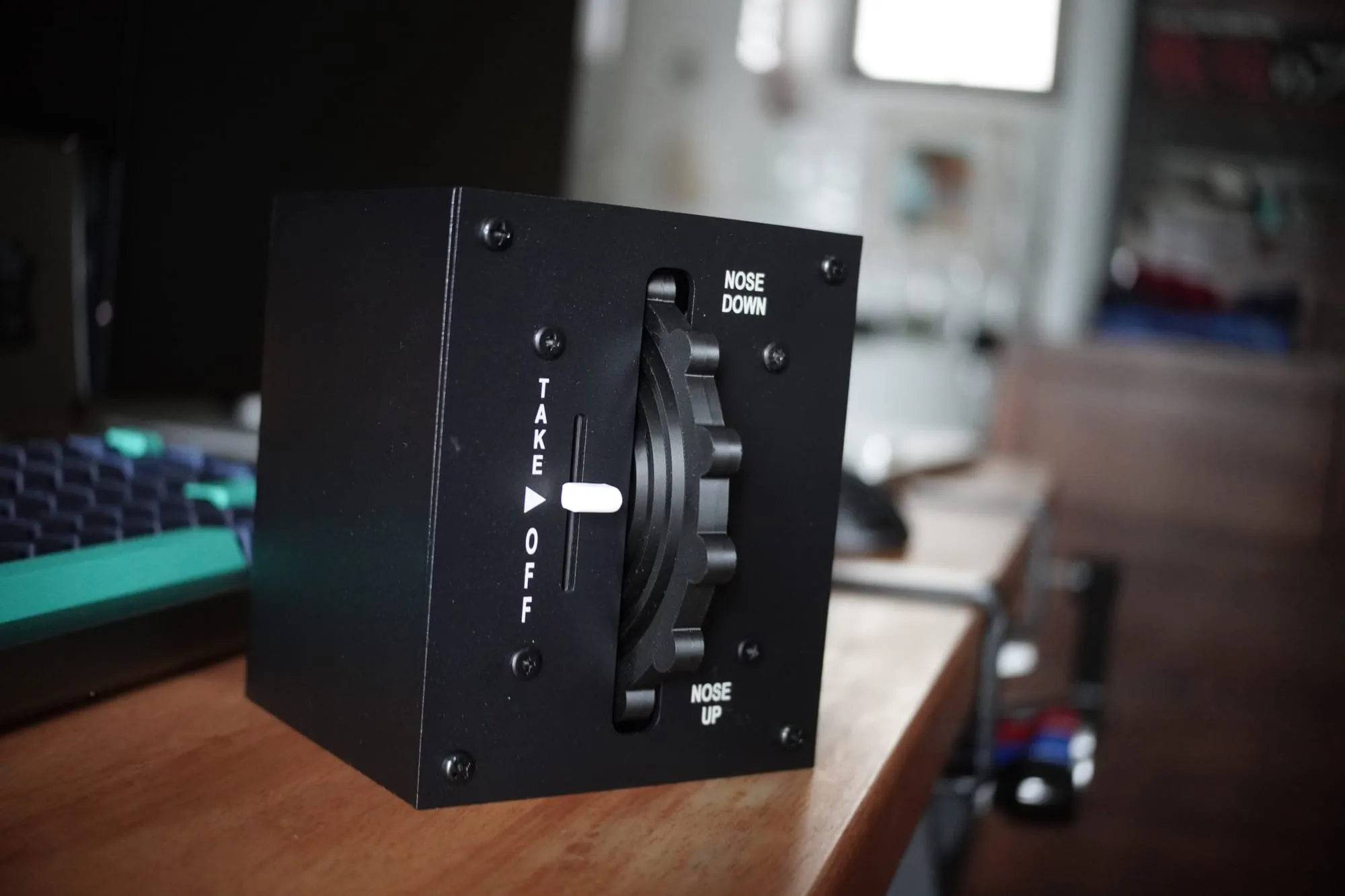
- Construction: alloy-style metal enclosure, 3D-printed trim wheel, geared indicator
- Connectivity: single USB-C port at the rear
- Mounting: four screw holes on the bottom and four at the rear; included desktop clamp
- Compatibility: MSFS 2020/2024, X-Plane, PC — plug and play, no drivers or config software
- Variants: desktop clamp version (reviewed, a fully boxed unit) and a cockpit panel version that mounts directly into a sim build
- Price: US$79.99 boxed desktop version with clamp (reviewed) · US$59.99 Home Cockpit Panel version (front panel only, no enclosure, for direct dashboard mounting) — at review time only the panel version was in stock
- Warranty: Amazon-standard third-party warranty terms
What you should expect in practice:
- Trim adjustment that behaves like the real wheel in a 172 — roll it, feel it, see it move
- A takeoff indicator that tracks the wheel mechanically, but not necessarily the sim
- No software to install, ever — the unit appears in the sim as a standard joystick device
- A sturdy metal box with no visible branding anywhere on it
- Autopilot trim misaligns it — the unit isn't motorized, so every time the autopilot trims the aircraft, the sim's trim moves without the wheel. The wheel position and box indicator no longer match reality until you re-trim manually, and turning the wheel after an autopilot change produces a sudden trim jump
Setup and first-use reality
The packaging is plain cardboard with minimal branding — "Meza Simulator: bringing the cockpit to your desk" — and I wouldn't trust the box to survive a second shipment. Inside it: the unit, a USB cable, a basic desktop clamp, a printed manual, and a screwdriver, which is an unexpected and welcome inclusion for the mounting holes.
The manual covers five steps and they're accurate. Connect the USB cable to the port on the back of the box, plug into the PC, open the sim's control settings, select the device, filter to all, and bind the elevator trim axis. That's it. There is no driver, no firmware updater, no vendor app asking for updates. In a hobby where every new box traditionally means another software install and another folder of utilities, this is genuinely rare and worth as much as any hardware feature.
Two things surprised me on first handling. The enclosure is an alloy cube that feels substantial in hand — closer to an instrument-case build than a desk toy. And the trim wheel is clearly 3D printed, but the print quality is good: solid, smooth, and with enough weight in rotation that it doesn't feel like a prototype part. The takeoff indicator on the front moves with the wheel through a small internal gear, which is a nice mechanical touch.
I hit one snag during configuration, which the manual's five steps otherwise paper over — selecting the right device among several controllers takes a moment to work out. After that, it ran natively in the simulator with no further setup.
The clamp deserves its own note because it's one of the most interesting parts of the package. It mounts in two positions — clamping the unit on top of the desk edge or in front of it — and it's a genuinely heavy-duty, well-designed piece that would sell for around US$20 on its own at third-party retailers. It also fits a Thrustmaster control stick base, which gives it a second life if the trim wheel ever doesn't work out: you at least keep a mount that works with a standard base spec. In practice I never needed it — the unit is substantial enough in weight that it stays put on the desk without any mounting at all.
One curiosity: there is no Meza branding on the unit at all. No logo, no model number, nothing. The only place the name appears is the box. Between that, the Amazon-only sales channel, and the absence of any company website, the product reads like something originally designed as an OEM part for other simulator manufacturers that Meza later decided to sell directly.
The Magenta Standard evaluation
1. Mechanics — 4.0/5
The core question for a trim wheel is whether it's a wheel on an axle, and it is — this is the whole reason the product exists. The rotation is smooth and continuous with no detents or digitized steps, so it rolls like the Cessna wheel it copies. The travel and resistance feel slightly lighter than the real thing, which is the main deduction: real 172 trim has a distinct friction that holds the wheel against airflow loads, and this wheel relies on the gearing instead. It's directionally correct and won't build bad habits, but pilots converting to the real aircraft will notice the difference in friction immediately.
2. Tactility — 3.5/5
A wheel you can roll without looking is exactly right for eyes-outside trim practice. The deduction is the indicator: the takeoff reference on the front of the box moves with the wheel through its geared linkage, but it does not match the indicator position in Microsoft Flight Simulator exactly. When you're training the visual cue — glance down, confirm takeoff trim is in the green — the box tells you something the sim slightly disagrees with. You learn to ignore the box indicator and read the sim instead, which defeats the point of having a physical reference. There is no calibration adjustment to fix the alignment. Small problem, consistent annoyance.
3. Integration — 4.5/5
This is the best part of the product. It's a standard USB HID device: plug in, bind one axis, done. No drivers, no vendor app, and nothing installed on the PC for a sim update to break. MSFS recognized it immediately and X-Plane compatibility is listed on the Amazon listing. Every other piece of sim gear I've tested demanded some software tax — this one pays you back instead. The half-point deduction is the absence of any calibration tool, which is what would have fixed the indicator sync. There are two things to own, and the two sections below cover both: keeping the trim axis pointing the right way, and what happens when the autopilot is flying.
The flip side of that simplicity is that there is no system here. Every Meza product requires its own USB connection straight to your machine — a single USB-C connector out of the back, nothing to daisy-chain, nothing to add to, nothing to build on. It is literally a solo dumb box. Buy the flaps controller and the landing gear controller and you're running three separate cables to three separate devices with no shared mount, no hub, no unified config. For one product that's fine; for the ecosystem Meza says it's building, it's the gap that matters most.
4. Procedural — 4.0/5
Trim is a procedure control: set takeoff trim before the runup, roll trim through the climb, re-trim at level-off, trim the approach. A real axle supports all of it with correct gross-motor habits — the muscle memory transfers to the aircraft because the input is an actual wheel. The indicator mismatch is the procedural gap: if your checklist item is "confirm takeoff trim visually," the physical reference on the box can't be trusted as the source of truth and the sim's own indicator has to serve instead. The habit loop is right; the visual confirmation step is compromised.
5. ROI — 5.0/5
At US$79.99 for the boxed unit reviewed here — US$59.99 for the bare cockpit panel without an enclosure — this is the cheapest dedicated manual trim wheel on the market, and nothing else competes at this price with an absolute-position wheel. Desktop Pilot's trim wheel, built for the same Cessna training use case, last listed at US$112 and is no longer on sale. Its replacement, the V2 Trim Wheel with Indicator, costs US$199.95. The used Saitek Cessna trim wheel is discontinued and changes hands above its original price. The trim input on the Honeycomb Bravo, the mainstream recommendation, is an incremental encoder, so the wheel has no absolute position and can't show you where trim is set. One hour of aircraft rental in most flight schools costs more than this box. For a student pilot who has been fighting keyboard trim commands with no feedback — a genuinely miserable way to learn the most-repeated control input in the circuit — this is the lowest-cost path to a real axle, and the market has nothing else to offer in this range.
The other option: Desktop Pilot
If you want a trim wheel with a servo-driven indicator, the direct competitor is Desktop Pilot's V2 Trim Wheel with Indicator at US$199.95, two and a half times this one. It answers the flaw this review scores hardest against the Meza. The V2's indicator is driven by the sim, so it follows the trim even when the autopilot moves it. The Meza's indicator is geared to the wheel and cannot move on its own, which is what holds its Mechanics and Procedural scores down.
The way it connects is completely different, because the V2 talks to MSFS as a serial device rather than as a joystick. Desktop Pilot's SkySync software handles the conversation, and a WASM plugin it patches into your Community folder completes it. The manual says to leave SkySync running for every session. The Meza asks for nothing installed and nothing running, which is what earns it 4.5 on Integration. Buying the V2 means buying a better instrument and a software dependency, on Windows only.
Desktop Pilot sells a full ecosystem of GA panels, with a real website and support behind it, and Meza is Amazon-only with no web presence. The honest market note: at this price the Meza is the only dedicated trim wheel a buyer can actually get, and the V2 sits a tier above it rather than beside it.
Keeping the trim axis pointing the right way
MSFS 2024 stores control settings per device, and for a device it ships no preset of its own for, it does not reliably remember which preset you selected. The Meza is one of those devices, so the day arrives when you open the controls screen and the trim axis points the wrong way.
The fix is to stop owning the setting in the place the sim owns. Duplicate the preset it supplies, name the copy, tick the inverted axis on the copy, and leave with Save and Back.
- Open Settings, then Controls, and select Meza Trim
- Duplicate the preset and give the copy a name
- Tick “set inverted axis” on the copy
- Leave with Save and Back, with the wheel and every switch at rest
- If an aircraft still trims the wrong way, keep a second copy and choose per aircraft
The cause sits in the simulator rather than in the wheel. Asobo has fixed trim direction for individual aircraft and individual peripherals across four consecutive sim updates, and has never addressed the split across its own fleet. The report tracking that is still open, last replied to in February. Every analogue trim axis lives with this, including the wheels this one competes with, and it is why the score above did not move.
Flying it with the autopilot
With the autopilot engaged, the wheel overrides it the moment you touch it, and the autopilot trims straight back. MSFS reads the trim axis as an absolute position, so the wheel's setting is written into the elevator trim value, and the autopilot writes its own trim into the same place while it holds a pitch. An analogue wheel and a software autopilot write to the same value, with no clutch between them.
A real aircraft keeps one writer on that value. An autopilot with autotrim drives a trim servo and turns the wheel with it, while one without autotrim leaves the trim alone and flies the elevator. This wheel has no motor, and the sim's autopilot does drive trim.
So trim when you are hand-flying, and leave pitch to the autopilot while it is flying. If you want the two to coexist, the fix has to sit between the wheel and the sim. SimTrim, free for Windows, reads the wheel, moves the trim with its rotation, and re-aligns the wheel when you disconnect the autopilot.
Who this is for
- Student pilots practicing circuit procedures at home who need real trim inputs, not a rocker switch
- Simmers building out a C172-style training cockpit who want the wheel between the seats, not a switch on a quadrant
- Anyone allergic to vendor software — this is the rare device with zero install
- Existing owners of the Meza flaps controller or landing gear controller building toward a full GA panel set
Who should skip
- Simmers who fly airliners exclusively — there's no use for a C172 trim wheel in an A320
- Buyers who need the takeoff indicator to be authoritative; today it can't be calibrated and will disagree with the sim
- Cockpit builders wanting a finished branded product — this unit ships with no branding, no website support, and Amazon-only after-sales
What would change the verdict quickly
- A calibration routine (even a simple offset adjustment) to align the physical indicator with the sim — this alone would lift Tactility and Procedural
- A firmware or mechanical revision that syncs indicator travel to the sim's indicator range
- A product page or website with the mounting dimensions, variant comparison, and support contacts — right now the Amazon listing is the only documentation in the world
- A cheaper-feeling enclosure traded for a more substantial wheel and indicator — the alloy shell is premium, but the wheel is the part you touch and the indicator is the part you read, and the US$80 price would survive a plastic box
These gaps aren't going unaddressed. After the review published, Meza told me it is working on the two biggest ones: a way to connect multiple Meza devices together over a single USB connection to the PC, replacing the one-cable-per-box problem as a cockpit grows, and improvements to the areas flagged above. The company has been moving toward a modular ecosystem direction, and this is the first concrete commitment in that direction. I'll revisit the verdict when the hardware ships.
Frequently asked questions
Is the Meza trim wheel compatible with MSFS and X-Plane?
Yes — it's a standard USB HID device, so it works with Microsoft Flight Simulator 2020 and 2024 and X-Plane with no drivers and no configuration software. You bind one axis, the elevator trim axis, and it runs natively in the sim.
How much does the Meza trim wheel cost?
US$79.99 for the boxed desktop version with clamp, US$59.99 for the Home Cockpit Panel version — the front panel without an enclosure, for mounting directly into a dashboard. Amazon is the only sales channel, and at the time of review only the US$59.99 panel version was in stock.
Can you calibrate the takeoff indicator?
No. The physical takeoff indicator moves with the wheel through an internal gear, but its position does not exactly match the indicator in Microsoft Flight Simulator, and there is no calibration routine to align them. Most owners learn to read the sim's own indicator instead.
Does the Meza trim wheel work with the autopilot?
Not while the autopilot is flying. The wheel is an absolute axis, and MSFS's autopilot writes to the same elevator trim setting while it holds a pitch, so the wheel overrides it the moment you touch it and the autopilot trims straight back. Trim while you are hand-flying and let the autopilot look after pitch when it is engaged. SimTrim, a free Windows utility, sits between the wheel and the sim and re-aligns the wheel when you disconnect the autopilot.
Is the Meza trim wheel better than the Honeycomb Bravo trim wheel?
They serve different needs. The Bravo's trim is an incremental encoder with no absolute position, while the Meza is an analogue axis with a geared takeoff indicator — closer to a real C172 wheel. The Bravo makes sense if you also need a full throttle quadrant; if trim is the only control missing, the Meza costs a third of the price.