Meza Aircraft Switch Panel review: a C172 switch panel that does its job exceptionally well, yet has no ecosystem around it
Every switch here does what a switch panel needs to do for procedural training, and does it well. Now it just needs to connect to the rest of Meza's excellent lineup.
Sim to solo Flying for real as well? Compare training pathways →
A C172 switch panel that does its one job exceptionally well and stops there: 27 controls that match the aircraft, a metal case, no software, and a product line where nothing connects to anything else.
| Mechanics | 5.0 / 5 |
| Tactility | 5.0 / 5 |
| Integration | 4.0 / 5 |
| Procedural | 4.5 / 5 |
| ROI | 5.0 / 5 |
Intro
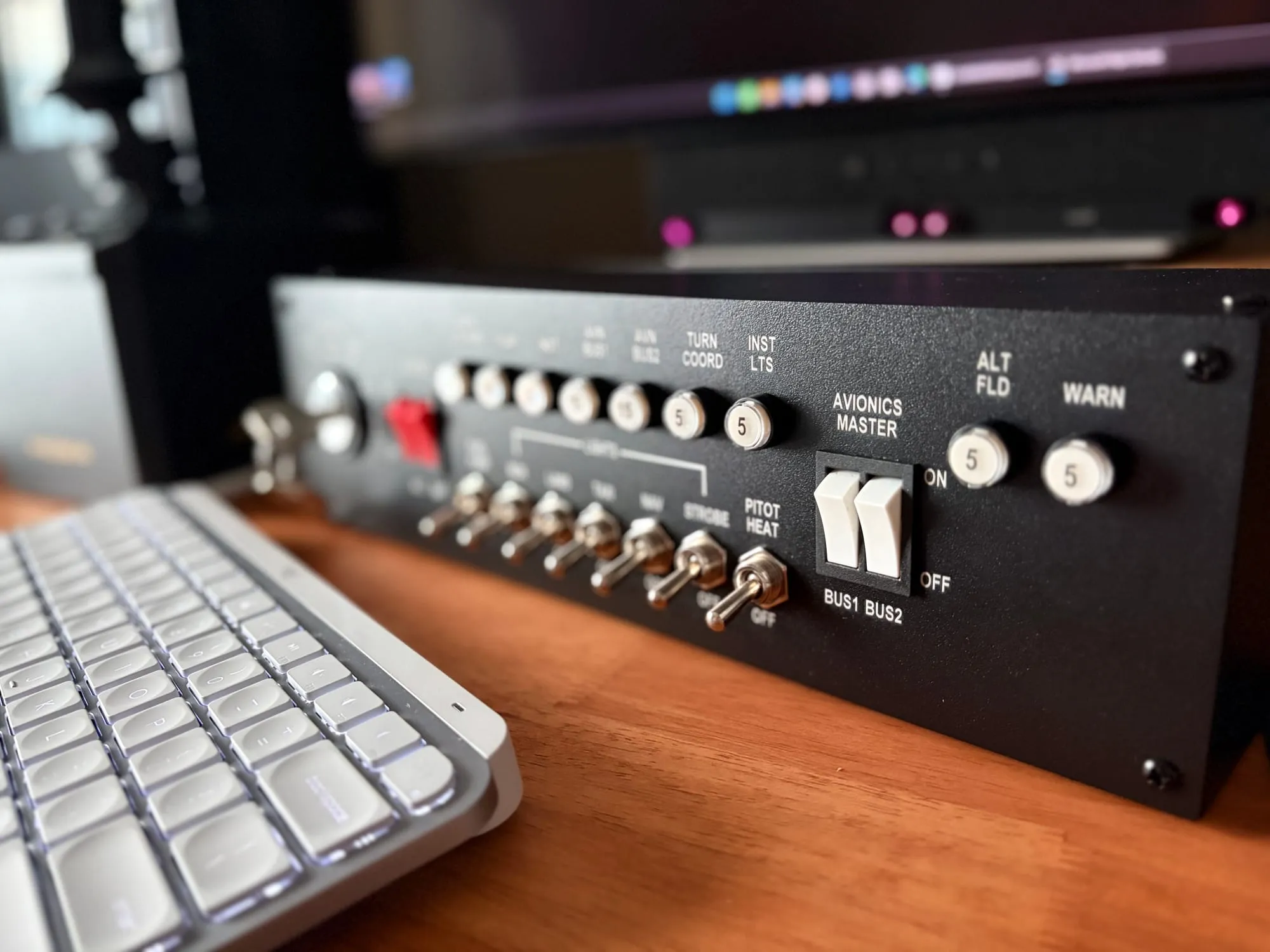
The Meza Aircraft Switch Panel is a row of Cessna 172 controls in an aluminum alloy case. Eleven switches cover the battery, alternator, avionics, pitot heat, the fuel pump and five light groups. A magneto key sits at the end of the row, with five positions and a START that springs back when you let it go. One USB-C cable, no software, US$140 with a desk clamp or US$100 without one.
Procedures are physical and that's why a box like this matters for students.
Avionics confirmed off → MASTER ALT/BAT on → beacon on → prime with fuel pump if injected, then pump off → clear/start → oil pressure → avionics on.
This panel, laid out like the actual aircraft, does more for that than a keyboard shortcut could ever. The switches sit where the Asobo C172's sit in Microsoft Flight Simulator, so your eyes know exactly where to look.
The panel does its job so well that it's almost boring. It works. There are even decorative fuses. They light up when pressed, but do nothing, which is fine. But you're left wondering about the loose ends: Meza only exists on Amazon, there's no downloadable profile from Meza, no drawings to build your own mount from, and nothing in the Meza line that connects to anything else in it. You're looking at excellent hardware with no system around it... and an evening of keybinding ahead of you.
About this review
Meza sent this unit for review so I did not pay for it. It arrived in October 2026, shipped to Singapore and declared as a review sample. The company suggested no angle for the piece and attached no conditions to the unit, and it did not see this draft before publication. There are no affiliate links in this review, and I am keeping the panel for future comparisons.
The MSFS 2024 profile published with this review is mine. There is no official profile from Meza, so I bound every control on this unit, then exported the file from Microsoft Flight Simulator 2024. The errors in it, if any, are mine. Download it at the end of this piece, try it, and tell me what you think.
What this is
- Type: standalone C172-style switch panel for flight simulators
- Construction: aluminum alloy case; metal toggles on the lights, pitot heat and fuel pump; plastic master and avionics rockers
- Controls: 27 buttons — eleven two-position switches and a five-position magneto key
- Connectivity: one USB-C port; shows up as a standard HID joystick, so there is no driver and no configuration software
- Mounting: screw holes on the rear and the underside, 5 mm; a desk clamp is supplied with this version
- Dimensions: 350 mm wide, 98 mm tall, 334 mm between the outer mounting holes, from Meza's own drawing
- Power: draws from the USB port; no external power needed
- Price: US$140 with the clamp, US$100 without (Meza's listing)
- Warranty: not published
What to expect in practice
- Two minutes to plug in and be recognized
- About an hour to bind 27 controls by hand, or two minutes with the profile in this review
- Switches that click loudly and take a deliberate hand. Exactly like in an aircraft, but noticeable at a desk
- No rubber feet, so the panel needs its clamp or a set of feet
- 22 of the 27 positions bound in the profile that comes with this review, and four avionics positions bound through the aircraft's own events. The fuel pump's off position is unbound
Setup and first-use reality
The panel is longer and shallower than I expected. It is a strip, not a sub-panel: 350 mm across, 98 mm tall, about as deep as a paperback. It is heavy, and the case is aluminum alloy at a time when most of this category is plastic. That matters at the controls: the switches are mounted in a rigid case, so what you feel through a toggle is the switch rather than a panel flexing under it.
The toggles are the part that matters. They are heavy-duty metal switches, and throwing one takes a deliberate hand and makes a sound you hear. In an actual aircraft that is right, and with a headset on you wouldn't notice. At a desk it carries across the room.
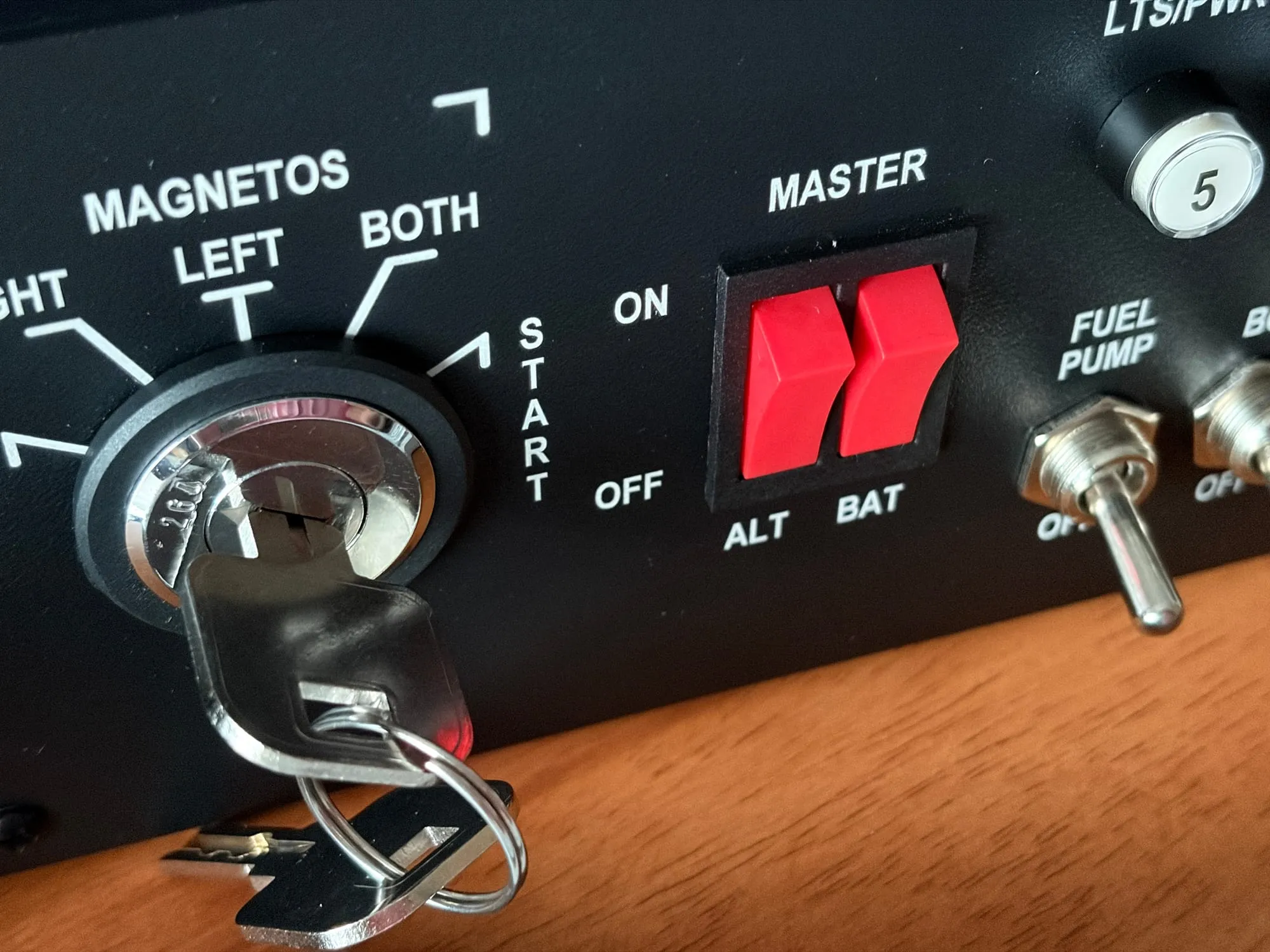
The ignition key is the best thing on the panel. The key goes in cleanly, the positions click distinctly from OFF through RIGHT, LEFT and BOTH, and START springs back under your fingers the way a real one does. All five positions report to the simulator as separate buttons, and releasing the key from START stops the engine cranking. By comparison, Logitech's aging switch panel at US$120 uses a five-position rotary dial, and Honeycomb's Alpha yoke uses a flimsy plastic switch. Neither offers you the fun of turning an actual metal key and having your engine roar to life.
The master and avionics rockers are solid plastic, and they are the only controls on the panel that are. They still take a firm push, which I hope will ease up over time.
Then there is the row of decorative fuse-style buttons. Push one in and it lights. Push it again and it pops back out, and the light goes. Nothing pops them: the row isn't wired to the controller, and the panel has no output channel, so the simulator cannot drive anything on it. Meza says the illuminated push buttons "are intended as decorative cockpit elements rather than simulator-mapped controls." So it's a novelty rather than a fault, and the one part of the panel that is purely for looks. That row is the only part of the panel that does nothing. Everything else is the job.
One competitor's panel in this category does make the row work: Desktop Pilot's Lighted Fuse Ignition Panel sells for US$300, and its page says the fuse breakers give "active circuit functionality, not decorative placeholders". Its manual says the simulator sends failure data to the buttons through SkySync, so a failure injected in X-Plane's instructor station lights the matching one, and pressing a button inserts or clears a failure. Buying that row means running a Windows program (the panel is a serial device), and on Microsoft's simulator it also means a plugin patcher from GitHub before the panel will connect. Making this row work costs almost double that of Meza's, and the cable on that panel is the less common USB-B.
Around the back there is one USB-C port and nothing else. No second connector, no power jack, no daisy-chain. There are mounting holes on the rear and the underside, and four screws where feet would go. But there are no feet, and the panel slides on a bare desk when you throw the switches. It's barely usable that way (especially given the heavy switches), so I fitted my own rubber feet within the first hour. Meza ships a heavy metal desk clamp for this reason.
I spent the first hour on keybinds. The box includes a printed table that lists every control and the event it should send. No other panel I have reviewed in this category ships anything like it. It also binds every switch to its own event (see below) — master battery on, master battery off, strobe on, strobe off — rather than to a toggle. Meza's X-Plane files use the same per-position events.
Compare this with the WingFlex DAP 500, which I reviewed in July. The company won't issue an official profile or tell you what to map the buttons to. That means if you bind one thing wrong — mode logic, HDG/TRK, NAV/APR behavior — you rehearse the wrong procedure. A printed table that says which switch carries which event is the difference between practice and rehearsing something the aircraft does not do.
But I struggled with the avionics switches. Bound the way the sheet says, the avionics rockers remained dead in the C172 G1000. The fault is not in Meza's wiring, because the panel reports those positions correctly. Asobo's C172 uses its own input events instead of the sim's standard avionics events, and those live outside the device profile. Searching the controls screen for "avionics bus" finds four rows. Once they are bound to the panel's buttons, the switch works.
If you own this panel and fly the C172 G1000, bind these four rows by hand. Microsoft's simulator counts the panel's buttons from 1, and Meza's booklet counts them from 0, so the booklet's Btn10 is button 11 in the sim.
| What to bind | The panel's button |
|---|---|
| Avionics bus 1 on | button 11 |
| Avionics bus 1 off | button 10 |
| Avionics bus 2 on | button 9 |
| Avionics bus 2 off | button 8 |
Those four are the only controls the printed sheet cannot settle, and without them the avionics switch stays dead. Meza's table points both avionics rockers at the simulator's avionics master events, and the C172 simply ignores them. Meza has said it will add the correct bus bindings to its updated instructions.
I put together a Microsoft Flight Simulator 2024 control profile exported from a working C172 G1000 setup, and it carries 22 of the panel's 27 buttons. It might save you an hour. The four avionics rows are in the same download, because they belong to the aircraft.
The Meza C172 G1000 profile for MSFS 2024, as a zip. It holds the XML and the install notes. Save it anywhere on the PC, unpack it, then in the simulator go to Settings, Controls, the gear beside the profile name, and Import.
The Magenta Standard evaluation
1. Mechanics — 5.0/5
The job is to feel like an aircraft control, and these do. The toggles are heavy, the key clicks through every position, and START springs back the way the aircraft's does. That is what makes the panel worth having: a student who has to mean every switch is practicing the action, not just the outcome.
The two plastic rockers are the exception, and they still take a firm push. The case is solid aluminum alloy and the switches are mounted in it, so the feel is the switch rather than the box.
2. Tactility — 5.0/5
Every control is where the sim's own C172 puts it, so the panel can be flown with your eyes outside. The controls are distinct by feel alone — heavy toggles for the lights, firmer rockers for master and avionics, a key for the magnetos — and you hear what you changed. The decorative row of fuses is a novelty that costs the score nothing. Nothing here needs the mouse.
3. Integration — 4.0/5
Plug it into a Windows PC and the simulator sees a game controller, because the board inside is a standard HID joystick. No driver, no configuration utility, no mapper. I'm always happy when I don't have to launch yet another piece of software just to fly.
The work is in binding. All 27 controls are bound by hand, and Meza's printed table lists 25 of them. Twenty-one of those bind correctly in the C172 with better documentation than Meza's competitors provide. The two avionics rockers are the exception: the table points them at the simulator's avionics master events, and the C172 ignores those.
There's no official profile from Meza for Microsoft's simulator, and its own configuration files are for X-Plane, so the evening of binding is ahead of you. There's no company website either. The Amazon listing is the shopfront, the support desk and the manual, and the only files Meza hosts sit in a public Google Drive folder that is only linked to via a QR code on the instruction sheet.
4. Procedural — 4.5/5
This is what a switch panel is for, and the habit loop is right: master, alternator, avionics, fuel pump, lights, pitot heat, magneto, in the aircraft's order and in the aircraft's places. The events are per position, so the switch on your desk always matches the state in the sim, and a student can run a start, a shutdown and a lighting check here.
One thing keeps it off 5: the fuel pump's off position is unbound in the documentation.
By the way, the illuminated row does not count against it. It copies the breaker panel of a 172 and nothing on it can be driven from the simulator, so it's a novelty rather than a half-taught procedure.
5. ROI — 5.0/5
US$140 buys 27 physical controls in a metal case that need no software, no driver and no license. Logitech's switch panel costs US$120, is plastic, carries fewer controls, and needs third-party software before most of its functions work; add a SPAD.neXt license and it costs more than the Meza.
An hour in a 172 costs more than this panel, which is the comparison that matters for a student. A student who rehearses the start sequence at the desk twenty times has spent nothing after the first purchase, and saves rental time on what should not need an aircraft. Nothing else under US$150 in this category compares on build and function.
Three boxes, no system
Here's a paradox: Meza's products are good and yet they don't fit together physically or digitally. This panel has its own dimensions, its own USB-C cable and its own desk clamp. The trim wheel I reviewed in September has its own. So does the TPM. Or everything else that Meza is selling. Nothing shares a footprint and nothing interlocks, and no two clamps are the same part. A cockpit built from these products is a set of odd boxes on a desk.
Three units want three USB ports, three cables and three clamps. Each clamp is a machined part the buyer pays for with every product.
The odd thing is that Meza has already drawn the schema that fixes this. The printed booklet carries a dimensioned drawing: 350 mm, 334 mm between the outer holes, 98 mm tall, 5 mm holes. Publish that as a CAD file, and do the same for every product, and owners can print their own mounts and enclosures. It costs a file upload.
But the upload needs somewhere to live. Meza has no website at all. The QR code in the box points at a Google Drive folder that nothing else links to, and no product page exists for a buyer or a search engine to find. For a company selling six products on one Amazon storefront, a site with a page per product — the tables, the drawings, the files — is the difference between a shop and a system.
Honestly, Meza builds good hardware at a fair price, and documents it better than its competitors. Oddly, it has not built the thing around the hardware: the profiles that make setup two minutes, the drawings that let people mount the products together, and the site that holds both.
Who this is for
- Students flying the Asobo C172 who want the switches to be physical, since the layout matches the screen
- Anyone building a C172 cockpit piece by piece and willing to clamp each unit down
- Buyers who want no software layer, because the panel is a plain HID joystick
Who should skip
- Anyone flying airliners or complex types. The legends and the order are a 172's
- Anyone who wants a system rather than a box. There's no stack, no shared mount and no rail, and every unit adds a cable
- Anyone unwilling to bind controls. The printed table is good, but you can't import into MSFS a piece of paper
- Anyone who wants the fuse row to respond to a failure. Desktop Pilot sells that at US$300, and it needs a Windows program running
- Buyers on the smallest budget. The panel-only version at US$100 still needs mounting and a cable
What would change the verdict quickly
- Publish the CAD. The mounting drawing already exists in the manual. A STEP or DXF file of the case and the hole pattern lets owners print their own mounts and enclosures
- Ship a profile. One file for Microsoft's simulator, hosted where buyers can find it, removes the hour of binding every buyer pays
- Add rubber feet. It's just a few cents per unit
- Update the printed sheet. Details on the avionics. Also, the fuel pump – the off position is unbound, and the simulator does list an off action for the fuel system pump. Bind it, and print the row on the sheet
- Build the website. Product pages, the tables, the drawings, the files, and a link from the listing
The binding map, as tested
Twenty-one of the 27 positions bind exactly as Meza prints them. The two avionics rockers need the aircraft's own events instead, and the sheet leaves out two positions. This is the map as it works in the Asobo C172, and the profile that comes with this review carries every row except the fuel pump's off position.
| # | Control | Meza's sheet | In this profile |
|---|---|---|---|
| 1 | Beacon lights on | SET BEACON LIGHTS | as printed |
| 2 | Fuel pump off | not listed | unbound |
| 3 | Fuel pump on | SET ELECTRIC FUEL PUMP1 | as printed |
| 4 | Battery 1 off | MASTER BATTERY OFF | as printed |
| 5 | Battery 1 on | MASTER BATTERY ON | as printed |
| 6 | Generator 1 off | ALTERNATOR OFF | as printed |
| 7 | Generator 1 on | ALTERNATOR ON | as printed |
| 8 | Avionics 2 off | AVIONICS MASTER 2 OFF | avionics bus 2 off |
| 9 | Avionics 2 on | AVIONICS MASTER 2 ON | avionics bus 2 on |
| 10 | Avionics 1 off | AVIONICS MASTER 1 OFF | avionics bus 1 off |
| 11 | Avionics 1 on | AVIONICS MASTER 1 ON | avionics bus 1 on |
| 12 | Pitot heat off | PITOT HEAT OFF | as printed |
| 13 | Pitot heat on | PITOT HEAT ON | as printed |
| 14 | Strobes off | STROBES OFF | as printed |
| 15 | Strobes on | STROBES ON | as printed |
| 16 | Nav lights off | NAV LIGHTS OFF | as printed |
| 17 | Nav lights on | NAV LIGHTS ON | as printed |
| 18 | Taxi lights off | TAXI LIGHTS OFF | as printed |
| 19 | Taxi lights on | TAXI LIGHTS ON | as printed |
| 20 | Landing lights off | LANDING LIGHTS OFF | as printed |
| 21 | Landing lights on | LANDING LIGHTS ON | as printed |
| 22 | Beacon lights off | not listed | beacon lights off |
| 23 | Magneto start | MAGNETOS START | as printed |
| 24 | Magneto both | MAGNETOS BOTH | as printed |
| 25 | Magneto left | MAGNETOS LEFT | as printed |
| 26 | Magneto right | MAGNETOS RIGHT | as printed |
| 27 | Magneto off | MAGNETOS OFF | as printed |
Frequently asked questions
Does the Meza switch panel work with Microsoft Flight Simulator 2024?
Yes, as a standard HID joystick with no driver. All 27 controls report to the simulator. Twenty-two bind to standard events in the profile published with this review, four avionics positions bind to the C172's own input events, and the fuel pump's off position is unbound.
Do the illuminated switches work in the simulator?
No, and Meza says so in the product listing: they are decorative cockpit elements. They light when pressed and go out when pressed again. The simulator cannot drive them, because the panel has no output channel.
Can I buy a switch panel with fuse breakers that light up in the simulator?
Yes. Desktop Pilot's Lighted Fuse Ignition Panel drives its fuse buttons from the simulator's failure data at US$300, so a failure injected in X-Plane's instructor station lights the matching button. It is a serial device, so SkySync has to be installed and running, and Microsoft's simulator also needs a plugin patcher. The Meza panel has no output channel, so the simulator cannot drive anything on it.
Does the panel need any software?
No. It appears as a game controller in Windows and binds directly in the simulator. There is no configuration utility and no mapper.
Can two Meza panels be stacked or mounted together?
Not with anything Meza supplies. Every product has its own dimensions, its own cable and its own clamp. Owners who want them fixed together have to make their own mount.
Is the magneto key a real key switch?
Yes. Five positions with distinct detents and a sprung START, and the key inserts and turns like a real one. Each position reports to the simulator as its own button, and letting the key spring back from START stops the engine cranking.