WingFlex DAP 500 review: A dedicated GA autopilot panel at US$139 let down by basic keyboard bindings
A dedicated GFC 500-style autopilot panel that works on the aircraft WingFlex supports natively, and manual binding work on everything else.
Sim to solo Flying for real as well? Compare training pathways →
A convincingly laid-out GFC 500-style autopilot panel with solid buttons, precise encoders, and excellent auto backlighting. On the aircraft WingBridge supports natively, the habit loop holds. Fly anything outside that list and you are binding by hand, because WingFlex documents nothing about what maps to what.
| Mechanics | 3.5 / 5 |
| Tactility | 3.5 / 5 |
| Integration | 3.5 / 5 |
| Procedural | 4 / 5 |
| ROI | 4 / 5 |
Editor's note — 20 September 2026, revised 16 October 2026
This is a long-term review. We published it on 26 June 2026, kept the unit, and went back to it in September 2026 to run the current software against what we found in June.
WingFlex has shipped five Bridge releases since publication. WingBridge now recognizes supported aircraft and configures the panel to match them without the manual binding pass we described in June, the supported list keeps growing, and a steady run of bug fixes has cleared most of what made the early builds feel unfinished.
Integration rises from 2/5 to 3.5/5, and Procedural and ROI both move from 3.5/5 to 4/5. The overall verdict goes from 3.2/5 to 3.7/5, the average of the five pillars.
One thing has not moved. WingFlex still does not publish what maps to what in MSFS, so on an aircraft outside its supported list the binding tables further down remain the only reference you have.
The body was tightened on 16 October 2026. No finding, score or recommendation changed.
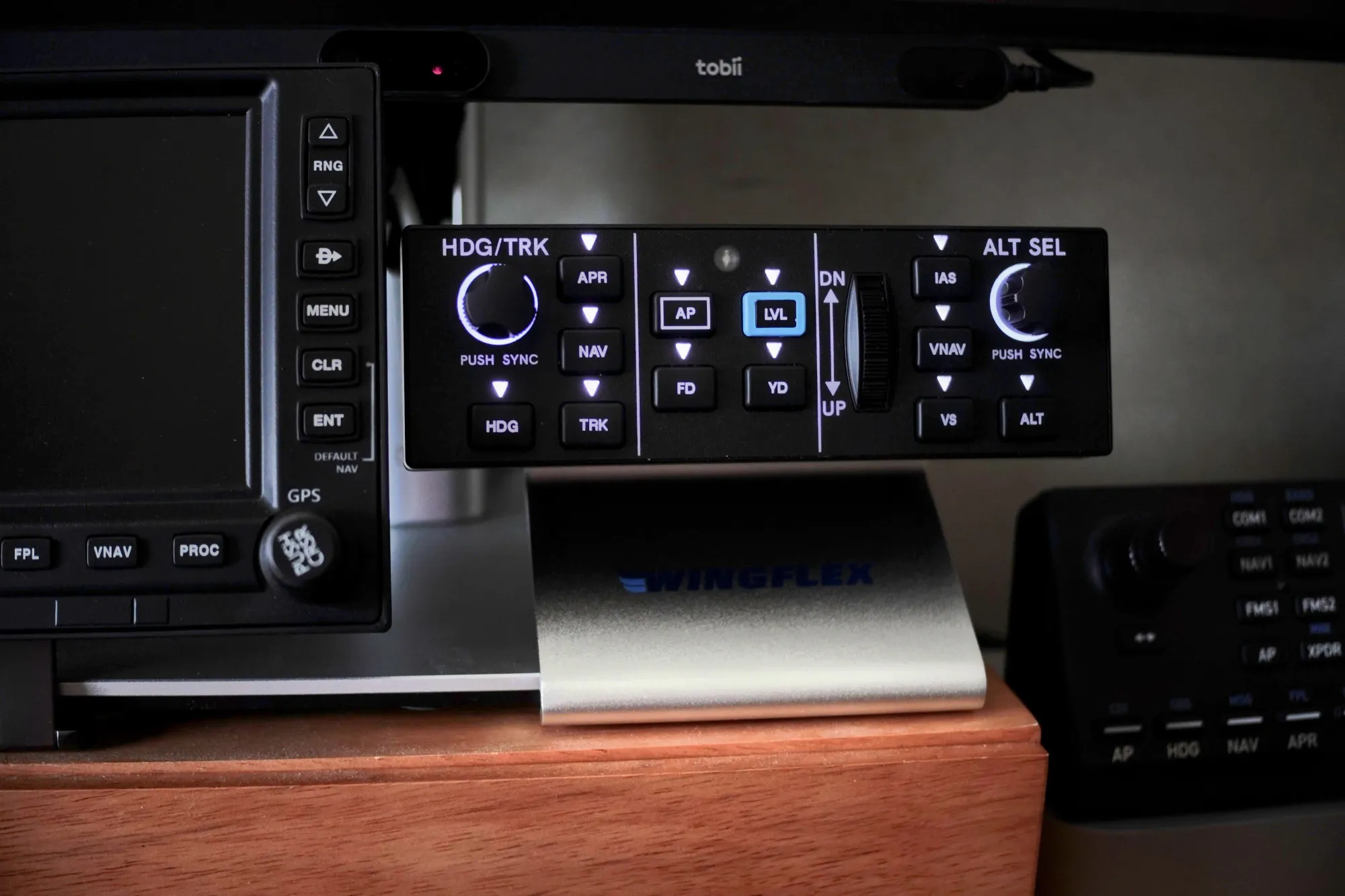
The WingFlex DAP 500 is a dedicated GA autopilot panel built to mimic the Garmin GFC 500 digital autopilot layout. If you’re trying to build autopilot hand skills that transfer, that physical constraint is the whole point: fixed button positions, labeled modes, and knobs you can hit without hunting for a mouse cursor.
The DAP 500's value now turns on whether the aircraft you fly is on WingFlex's supported list. On those types, WingBridge recognizes the aircraft and configures the panel to match, so it does the procedural job it was built for. Fly anything else and you are binding by hand, working out from scratch which MSFS control belongs to each labeled button, because WingFlex still publishes nothing about what maps to what.
First impressions: build, feel, and what you get in the box
How it feels in hand
The DAP 500 feels light. The case doesn’t feel premium and it sounds a bit hollow when handled, but the controls themselves don’t feel cheap.
Two controls stand out as weak points, and they break the build consistency of the rest of the unit:
- The ALT SEL knob press (push-to-sync) has a cheap, hard click compared to the rest of the hardware. That matters because altitude selection is a high-frequency workflow
- The center nose up/down rate wheel used to adjust pitch/airspeed/vertical-speed modes feels rough and stiff. It’s exactly the kind of high-touch control you want to feel smooth, because you’ll use it repeatedly in climb, descent, and approach management
What it ships with
My unit shipped with:
- The DAP 500 panel
- A solid aluminum mount/stand
- A supplied hex key for assembly
- A nylon USB cable that feels thick and durable, but not very flexible
Packaging is basic cardboard, but the unit arrived well protected.
Mounting and stability (this matters more than you’d expect)
This panel needs to be mounted or braced, because it moves under your hand while you work it.
The aluminum mount is sturdy, but it requires a hex key to assemble. A small miss: thumb screws would have made frequent repositioning less annoying, especially for desk users.
The stand also isn’t heavy enough to anchor the unit under hand load. I had to weigh mine down by sliding it under the monitor stand to get it stable.
Future stack potential (why WingFlex’s modular hints matter)
At Flight Sim Expo 2026, WingFlex hinted at stackable DAP-series auxiliary panels, such as communications audio and a transponder. There’s even a DisplayPort connector at the back to suggest this will chain to something else. If that ecosystem actually ships, the DAP 500 starts to look less like a one-off gadget and more like a modular GA control stack.
The software layer was the open question when that claim was made, and WingBridge has since answered it for the aircraft it supports. The limit that remains applies to the whole stack: every panel you add multiplies the binding work on anything outside the supported list.
What you’re buying (and what you’re not)
You’re buying:
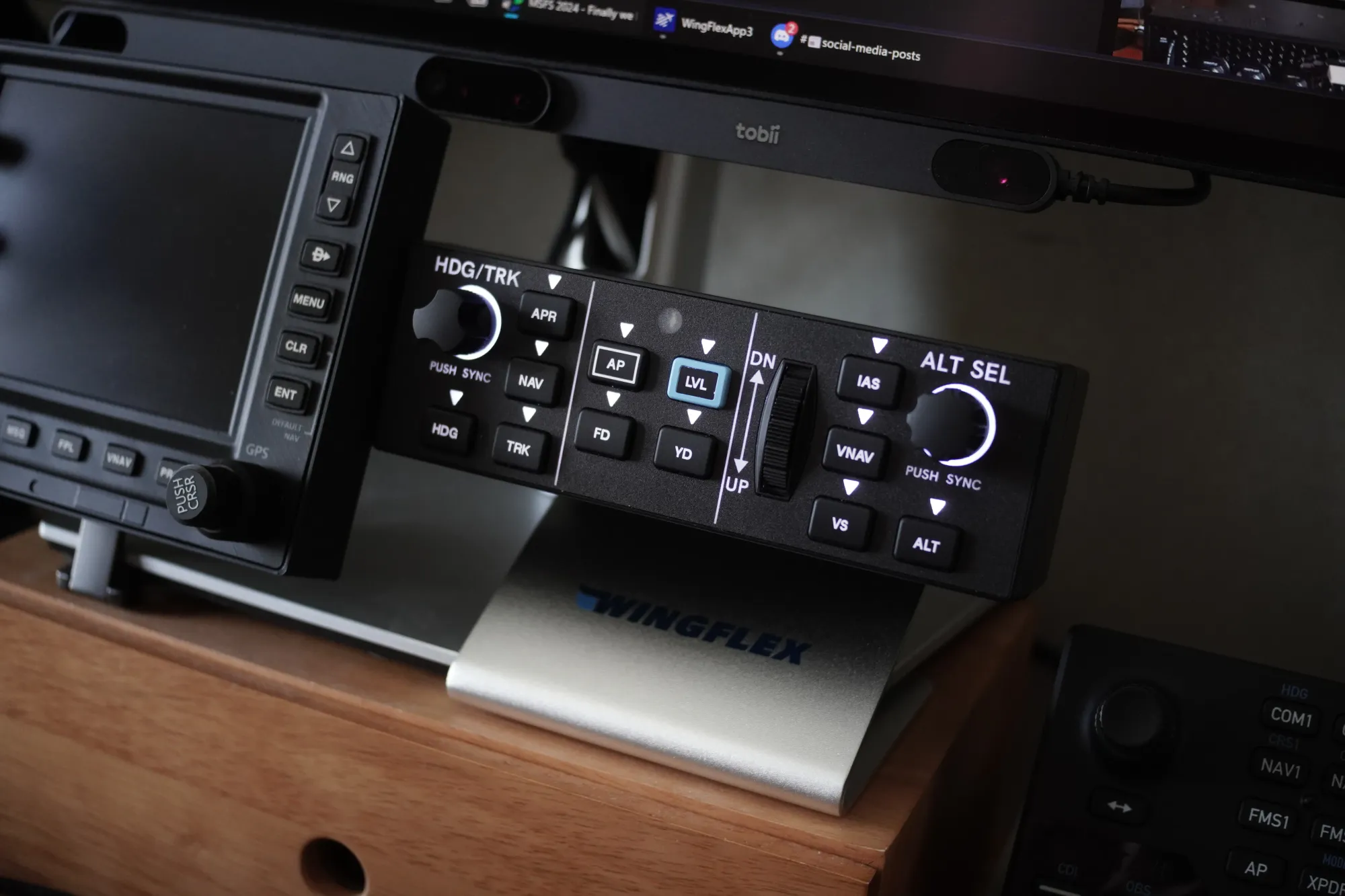
- A labeled, dedicated GFC-500-style control surface (AP/FD/HDG/NAV/APR/ALT/VS/IAS/VNAV/LNAV) with encoders and a rate wheel
- A backlit panel with an ambient light sensor that actually works well
- A standard USB HID device that Windows recognizes immediately
You’re not buying (yet):
- Plug-and-play on aircraft outside WingFlex's supported list
- Documentation for the MSFS bindings, so you are not working them out yourself
The Magenta Standard evaluation
Every piece of hardware reviewed by Magenta is audited against five pillars, and the test is transfer rather than immersion.
1. Mechanics — 3.5/5
The buttons feel solid for the price, and the encoders feel precise rather than “toy” hardware. The value here is layout and control density, which holds at the US$139 early-bird price.
The weak points are the ALT SEL knob press and the rate wheel, and both sit on high-frequency workflows. Mounting the panel settles the stability question.
2. Tactility — 3.5/5
Backlighting is the best-executed part of the “instrument” experience. The built-in ambient light sensor makes the panel readable without feeling like a glowing toy, and it reduces the urge to look down and squint.
The open question is state awareness. A GFC 500-style panel is only truly useful when you can trust that labeled buttons map to the expected functions and that your habit loop is stable. On aircraft outside WingFlex's supported list, where binding is still manual, it's too easy for the labels to become decorative.
3. Integration — 3.5/5
Windows recognizes it as a standard HID device with no drivers needed — plug it in, and it shows up as a set of buttons and axes any sim can read. That also means it works with community tools like MobiFlight and SPAD.neXt, which leaves room for experimentation beyond what WingFlex has built.
When this review was published in June, the integration failure was WingBridge:
- UI feels slow and clunky
- No aircraft mappings applied or offered
- There is no profiles area in WingBridge
- WingFlex’s website has no profile download section
- There are no import/export options for mappings
- No OTA updates available on the unit tested
- The manual does not explain how to bind controls in MSFS
Five Bridge releases later, that has changed. WingBridge recognizes supported aircraft and syncs the panel to them, releases now arrive on a regular cadence, and the manual binding work I described in June is no longer required on those types.
The deeper issue is training integrity, and it survives the update in narrower form. If you bind one thing wrong — mode logic, HDG/TRK, NAV/APR behavior — you rehearse the wrong procedure. On a supported aircraft that risk now sits with WingFlex. On anything outside the list it is yours, because the panel still ships without a single page explaining what maps to what.
4. Procedural — 4/5
A dedicated autopilot panel should reduce mode-management friction and keep your hand path consistent so your eyes can stay on the PFD.
On the aircraft WingFlex supports, that habit loop now holds: the panel configures itself and the buttons do what the labels say. The fragility is confined to everything else, where the training outcome depends on bindings you are working out yourself.
WingFlex already publishes a DAP function diagram covering button mapping and signal flow for developers. The sim side is missing, and one page showing which MSFS control each labeled button belongs to would close it.
5. ROI — 4/5
At US$139 the hardware price is aggressive next to established options like the Honeycomb Bravo's bundled autopilot row, and native support was the piece that was missing. On a supported aircraft the panel does real procedural work, so it is a straightforward value call. Buy it for anything outside that list and you are paying US$139 for a labeled faceplate plus a weekend of binding.
Which MSFS 2024 aircraft use the GFC 500
The DAP 500 mimics the Garmin GFC 500 layout, but that autopilot only comes stock on aircraft equipped with the G3X Touch avionics suite. In MSFS 2024, that's the CubCrafters XCub, CubCrafters NXCub, Zlin Aviation Savage Cub, Zlin Aviation Shock Ultra, and the Pipistrel Virus SW 121.
Everything else with a Garmin glass panel — Cessna 172 G1000, Diamond DA40/62, Bonanza G36, C182, Cirrus SR22 — uses the GFC 700. Different button logic, different hand path.
So if you don't already fly the G3X fleet, using the DAP 500 as a procedural GFC 500 trainer means you'll need to buy those specific aircraft in the sim. You can bind it to anything — but the habit loop only transfers when the cockpit reference matches the panel in front of you. The support list and GFC 500 fidelity are separate questions, and only two aircraft sit in both: the CubCrafters X Cub and NX Cub, which carry a GFC 500 in the sim and appear on WingFlex's supported list. If procedural transfer is the goal, that is the pairing to build the setup around.
DAP 500 key bindings for MSFS 2024
After spending time in the MSFS 2024 controls menu, we've worked out the correct key bindings for every button and knob on the DAP 500.
Standard autopilot buttons
| GFC 500 physical button | MSFS search term |
|---|---|
| AP (Autopilot Master) | Toggle Autopilot Master |
| FD (Flight Director) | Toggle Flight Director |
| HDG (Heading Mode) | Toggle Autopilot Heading Hold |
| NAV (Navigation Mode) | Autopilot NAV1 Hold |
| APR (Approach Mode) | Toggle Autopilot Approach Hold |
| VS (Vertical Speed) | Toggle Autopilot Vertical Speed Hold |
| ALT (Altitude Hold) | Toggle Autopilot Altitude Hold |
| YD (Yaw Damper) | Toggle Yaw Damper |
| LVL (Level Mode) | Toggle Autopilot Wing Leveler |
Knobs and wheels
For the rotary knobs and the scroll wheel, you must bind the specific left/right or up/down physical movements to the corresponding increase/decrease events in the simulator.
| GFC 500 physical control | MSFS search term |
|---|---|
| HDG / TRK Knob (Turn Right) | Increase Heading Bug |
| HDG / TRK Knob (Turn Left) | Decrease Heading Bug |
| ALT SEL Knob (Turn Right) | Increase Autopilot Reference Altitude |
| ALT SEL Knob (Turn Left) | Decrease Autopilot Reference Altitude |
| UP / DN Wheel (Scroll Up / Nose Down) | Decrease Autopilot Reference VS |
| UP / DN Wheel (Scroll Down / Nose Up) | Increase Autopilot Reference VS |
Advanced and tricky bindings
The real GFC 500 uses modern avionics logic. Here's how to handle the buttons that need specific attention in the default simulator menus:
| GFC 500 physical control | MSFS search term and notes |
|---|---|
| IAS Button | Toggle Autopilot Flight Level Change — do not bind this to "Autopilot Airspeed Hold." Modern Garmin units use Flight Level Change (FLC) logic. |
| VNAV Button | Toggle Autopilot Vnav |
| HDG Knob (Push to Sync) | Heading Bug Sync or PFD Button Press (varies by aircraft profile). This syncs the bug to your current heading rather than snapping to North. |
| ALT Knob (Push to Sync/Toggle) | No standard binding exists to toggle altitude increment step size (100 ft vs 1,000 ft) in default MSFS. Leave unassigned or bind to an alternative like toggling standard barometric pressure. |
| TRK Button | No native "Track Hold" toggle event in standard MSFS controls. Leave unassigned unless using third-party software like SPAD.neXt or MobiFlight. |
Who this is for (right now)
- You fly one of the aircraft WingFlex supports natively and want a dedicated, labeled autopilot panel
- You want tactile knobs and a stable layout, and you are willing to bind the controls yourself on anything outside that list
Who should wait
- You want plug-and-play on an aircraft that is not on WingFlex's supported list
- You want someone else to have worked out the bindings, because the whole point is habit transfer
What would change the verdict quickly
One item on this list has been delivered since publication: WingFlex now ships native per-aircraft support and publishes the list of supported types. What is left:
- Document what maps to what — a reference sheet showing which MSFS control each labeled button belongs to
- Make WingBridge's role explicit: what it configures, what it lights, and what still needs the sim's controls menu
- Official MSFS profile — WingFlex has confirmed they will not release one. The community (MobiFlight, SPAD.neXt) is the suggested alternative for now
What has changed since publication
After this review was published, we raised the integration issues with the company. WingFlex confirmed it will not release an official MSFS 2024 profile or support profiles for third-party tools like MobiFlight and SPAD.neXt. Their reasoning:
- Aircraft in MSFS 2024 respond differently to the same control settings, so there is no "one size fits all" profile
- They do not have the engineering capacity to maintain a separate support channel for third-party tools
- Their priority is WingBridge, so users get native support without third-party applications
- They recommend users join the MobiFlight and SPAD.neXt community forums for profile help
- They may reconsider if demand grows and capacity allows
That was a deliberate product decision rather than a shipping oversight, and a small team putting its engineers on the native software layer is a reasonable call. It left the training integrity question open, and the September re-test answered it.
WingFlex has shipped five builds of its Bridge software since this review was published: V3.0.0.1 on 30 June 2026, V3.1.0.0 on 24 July 2026, V3.1.0.1 on 30 July 2026, V3.1.0.2 on 31 August 2026, and V3.1.1.0 on 18 September 2026. Aircraft coverage has grown at each step — the COWS DA40 and DA42 in V3.1.0.0, Black Square aircraft in V3.1.0.1, and the Cirrus SR22 in V3.1.1.0 — alongside a redesigned Bridge interface, saved panel settings, and online software updates.
The company also now publishes a DAP Compatibility List on the DAP 500 product page, last updated 6 July 2026. It names 16 aircraft with native support in MSFS 2024, 10 in MSFS 2020, and eight across X-Plane 11 and 12. The MSFS 2024 entries include the stock CubCrafters X Cub and NX Cub. The Cirrus SR22 arrived afterwards, in Bridge V3.1.1.0. WingFlex qualifies the claim in a footnote: automatic adaption is available for selected aircraft on mainstream platforms only.
Its Bridge software page says a connected peripheral "will automatically sync with your chosen aircraft without the need for additional setup," and that both the software and the firmware can be upgraded online. That is native per-aircraft support, which is a different thing from a profile in the MSFS controls sense.
We have since tested it. On current Bridge builds the panel recognizes supported aircraft and sets itself up, and the bugs that dominated the June experience no longer do. The scores moved in the editor's note at the top of this review. What is still missing is the documentation: WingFlex does not publish what maps to what in MSFS.
The company's bug reporting now runs in public on GitHub, where the software is distributed and compatibility requests are tracked in the open. The repository's README carries a priority table with response targets, and DAP 500 requests move through it: the request for COWS DA40 and DA42 support was opened on 15 July 2026 and labelled released nine days later. The list of open issues is public, so owners can see what has been fixed and what is still outstanding.
Disclosure
I purchased the WingFlex DAP 500 directly from wingflex.com at the US$139 early-bird price using a US$50 partner discount code offered by WingFlex (so I paid US$89 shipped) in exchange for an honest review. No other financial arrangement, no affiliate revenue, and no draft was shared with WingFlex before publication. The unit will be retained for long-term comparison with competing hardware.