Honeycomb Echo Aviation Controller review: a US$150 handheld built for procedures while you're on the road
Honeycomb's wireless handheld flight deck at US$150 — linked rudders, trim wheel, travel case — is plug-and-play in X-Plane and built for procedures practice, not control feel.
Sim to solo Flying for real as well? Compare training pathways →
Honeycomb packed a full GA panel — stick, throttle, flaps, trim, gear, and linked rudder pedals — into a wireless handheld that fits in a travel case. It doesn't pretend to replicate a yoke — its job is to get you flying in seconds, which is what procedures practice actually needs.
Magenta Standard verdict 3.7 / 5
As far as I can tell, the Echo is the only wireless handheld all-in-one flight controller you can buy outside the US and Europe — and it turns out the right way to judge it is as a procedures trainer, not a replica.
| Mechanics | 2.5 / 5 |
| Tactility | 3.0 / 5 |
| Integration | 4.0 / 5 |
| Procedural | 4.5 / 5 |
| ROI | 4.5 / 5 |
Reviewed by Alan Soon · 17 AUG 2026 · Price US$150 before shipping · Methodology
Intro
The gap between lessons is the enemy of a student pilot's progress. Two weeks away from the cockpit and the scan rusts — flows slow down, the trim hand gets heavy. sim practice between lessons is how you keep that alive, and until now that meant a desk, a yoke, and a pedal set that stays at home.
The Honeycomb Echo Aviation Controller is built to kill that gap. It crams the core of a yoke, a throttle quadrant, and rudder pedals into a handheld unit that runs on a dongle or a USB-C cable, and it ships in a foam-injected travel case. Honeycomb's pitch is that the cockpit fits in your carry-on — and for a student pilot who travels, that's a genuinely new capability class for sim gear. There's a second benefit that matters as much as travel: there is nothing to set up. No desk mounts, no clamps — you unzip the case and you're flying, which means the unit gets used when you have twenty minutes rather than an afternoon. One thing up front: this is an Xbox-style controller with flight controls added, not a replica of a yoke. Can a US$150 handheld with flight controls actually help you practice flying? The question this review explores is whether a gamepad can still deliver real training value — and the answer turns on what you're practicing, not how the controls feel.
About this review
I bought the Echo Aviation Controller with my own money while traveling in Canada — C$230 including shipping, from AvWorld. The US list price is US$150. There is no relationship with Honeycomb or AvWorld, no review sample, and no affiliate links in this piece. Neither company saw a draft before publication. I wrote this review on the road in Canada, which turned out to be the exact use case the product is built for.
What this is
- Type: Handheld all-in-one flight controller for PC and Mac
- Construction: Console-style handheld, hard plastic with rubberized grips; hard-shell travel case included
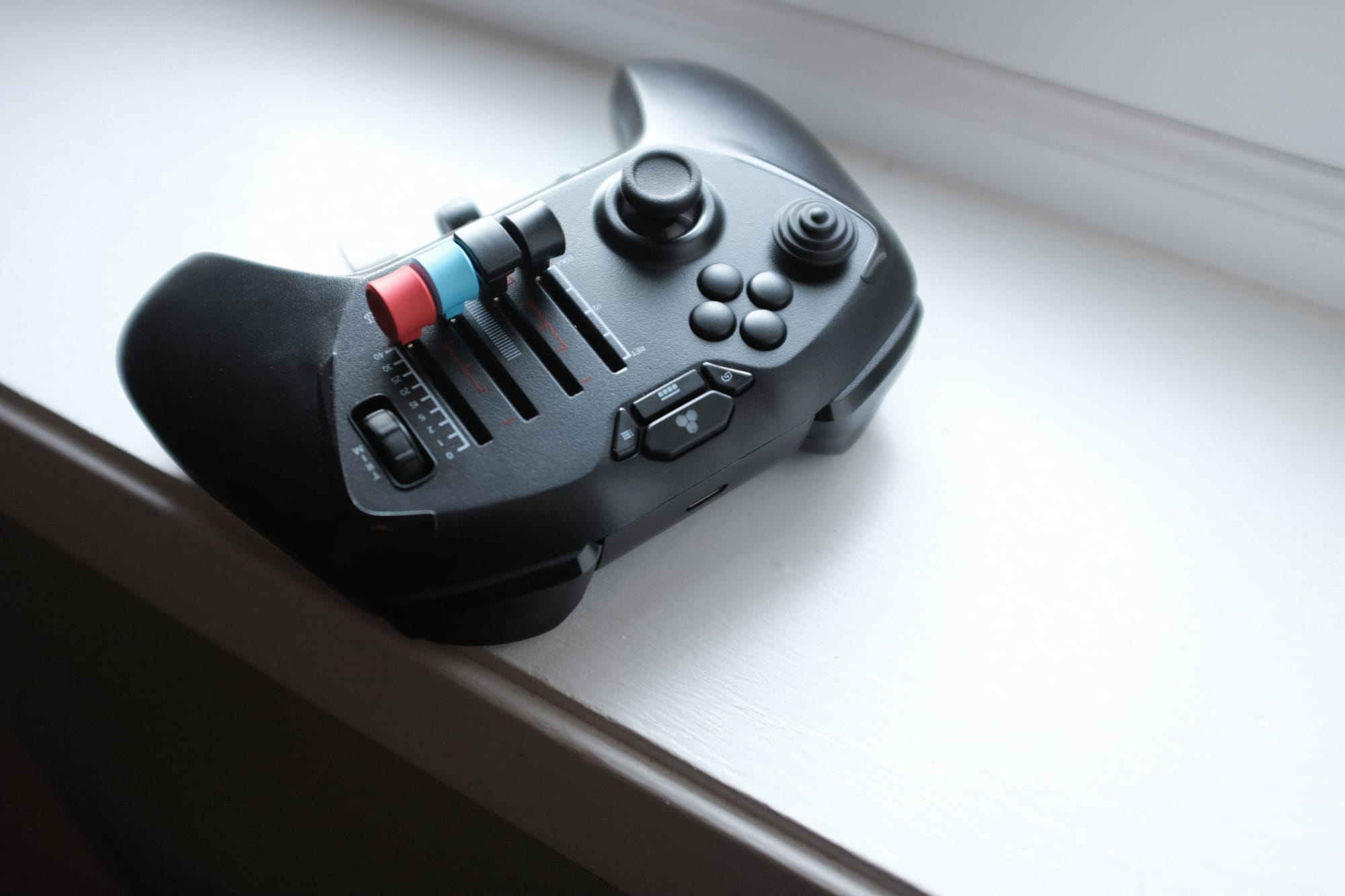
- Inputs: 16-bit Hall-Effect thumbstick (pitch and roll); mechanically linked, self-recentering Hall-Effect rudder pedals; four detented sliders with swappable caps (throttle, flap, speed brake, slat flap); notched trim wheel; levers for flap, parking brake, and gear; assignable shoulder buttons, D-pad, and hat switch
- Connectivity: 2.4 GHz wireless dongle (USB-A) or USB-C wired — USB-C carries data, not just charge
- Battery: 1200 mAh, up to 15 hours claimed — I didn't measure endurance, but it never became a factor in my sessions
- Compatibility: Microsoft Flight Simulator, X-Plane 11 & 12, Prepar3D
- Warranty: 2-year limited
- Price: US$150 (flyhoneycomb.com)
- In the box: controller, hard-shell travel case, GA and commercial lever caps, 2.4 GHz dongle, USB-C to USB-A cable, quick start guide
What you should expect in practice: the control density hits you before anything else — more switches, levers, and axes than any gamepad has any right to. This is an Xbox-style controller with flight controls added; it doesn't try to replicate the feel of a yoke, and you shouldn't expect it to. The travel case is the most thought-through part of the package. The stick is too sensitive out of the box and needs its sensitivity cut roughly in half. The dongle is for wireless — if you're wired, a USB-C cable is all you need.
Setup and first-use reality
The box and the case
The shipping box is solid and well-made — it closes with a magnetic clasp, a nice touch for a box — but the surprise is inside: the controller ships in a zipped, foam-injected travel case with molded cutouts that hold the unit and its accessories comfortably and safely. The insert is shaped to the unit, not a padded sleeve thrown in as an afterthought, and it's clear a real manufacturing effort went into it. The case plus the wireless plus the battery all point one way: Honeycomb designed this as a travel product, and it shows.
One QC nit: the swappable lever caps arrived loose in the case even though there are mounting positions for them. They didn't rattle around enough to cause damage, but on a new unit you expect everything to sit where it's meant to.
First touch
The first thing you notice holding it is the sheer number of buttons and controls. That density is genuinely impressive — but it doesn't have the feel of an Xbox controller. It lacks the weight, the heft, the density; in some ways it feels like cheap plastic. The preinstalled lever caps for throttle, flap, and speed brake feel flimsy, and they're quite sharp around the edges. The flap lever is stiff and equally cheap-feeling.
The trim wheel deserves its own paragraph. It's the killer feature — a physical wheel for pitch trim instead of a button, which matters more than it sounds — but it's not smooth, and the notch is loud and hollow. It clicks like cheap plastic doing a job. I'm thankful it's there; I just wish it felt as good as it works. It also has a documented flaw: owners on Reddit report the trim wheel freezing the controller's other inputs for moments while the trim catches up, on multiple units, wired or wireless, across aircraft and profiles. One owner traced the wheel's encoder firing four times per detent, sometimes twice mid-detent, and had to write a debounce script to make it usable. For a training device that's a real concern — trim is the control you reach for in the circuit, and it's the moment you can't afford the controller to lag.
Ergonomics
In your hand, it's hard to do everything at once. Your thumb sits fine on the stick for pitch and roll, but reaching the buttons above it is a stretch. The access levers for speed brake, throttle, and flap sit close together, and picking the right one takes effort. All the buttons are closely packed — a challenge until muscle memory kicks in.
The rudders
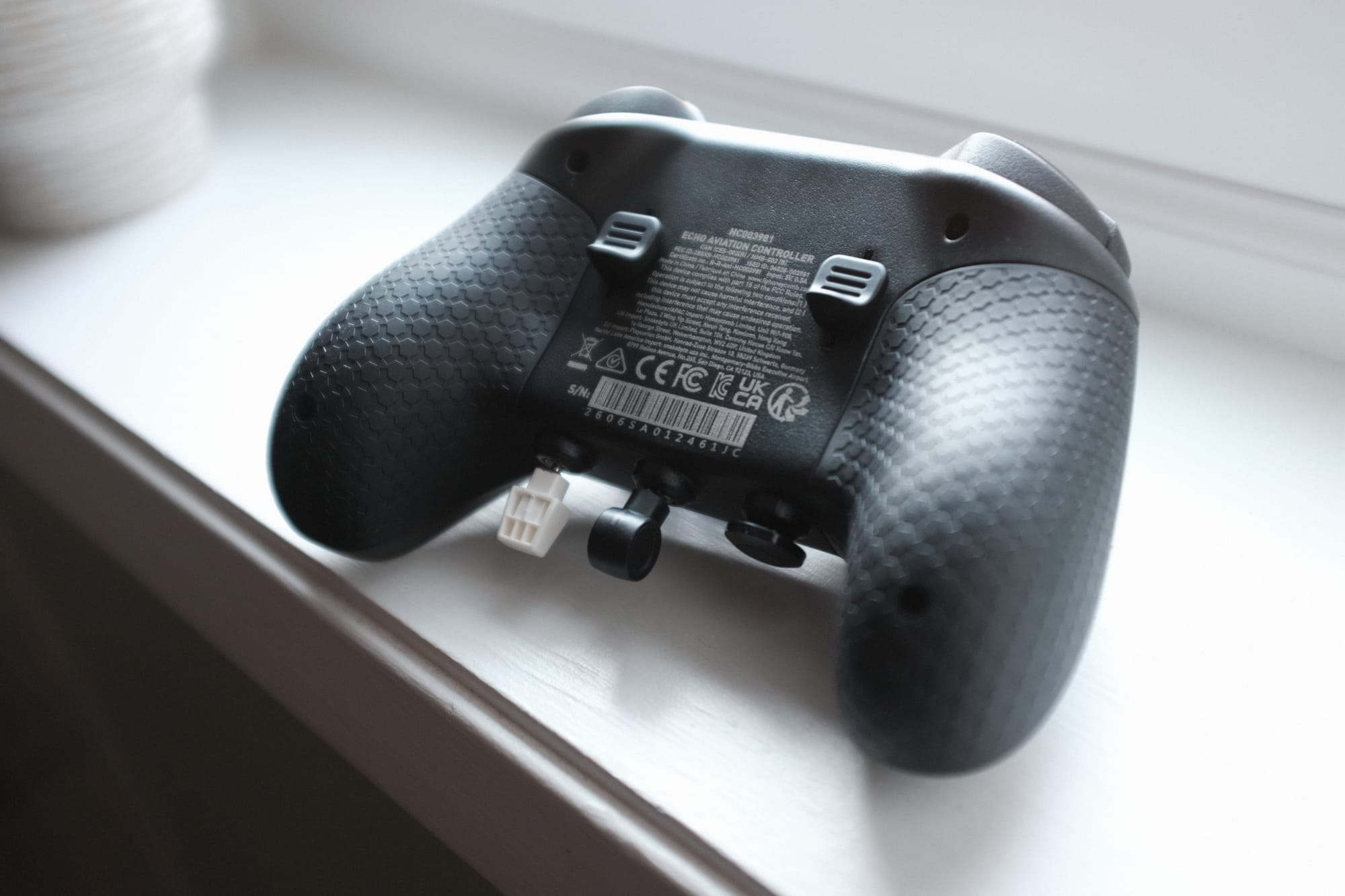
Around the back is where the unit truly shines. The rudder pedals are mechanically linked and self-recentering, and they fall right where your middle fingers sit. They're not incredibly smooth, but they work really well — and because they're linked, they teach coordinated inputs rather than the on-off triggers of a standard gamepad. On a C172 crosswind this is the difference between practicing the real thing and practicing a toy.
Connectivity
Wireless mode requires the USB-A dongle plugged into your machine, which is awkward on a USB-C-only laptop. The fix is simple: plug in a USB-C cable and it works as a wired controller — data, not just charge, which my test confirmed.
First flight
I flew a C172 in X-Plane 12 on a MacBook Pro, on the road in Canada. Recognition and binding were plug-and-play — the sim picked the unit up and every axis mapped without a fight. The one real stumble: the Hall-Effect stick is too sensitive out of the box. I cut the X and Y axes by half before it felt right — a default that hot out of the box is a firmware issue, not a taste issue.
The Magenta Standard evaluation
The Magenta Standard for hardware asks one question: does this help a pilot build the right habits, or does it risk building the wrong ones?
1. Mechanics: does it mimic real aircraft control travel and resistance? — 2.5/5
This is obviously an Xbox-style controller. It is not meant to replicate the real thing, and scoring it as a replica would miss the point of the product. The forces are light, the travel is short, and nothing about it will convince your hands they're on a yoke.
That honesty matters for one reason: muscle memory transfer is low on a unit like this. What you practice here is the sequence of the procedures, not the feel of the controls. The linked rudder pedals deserve a mention because they work genuinely well for a gamepad, and the Hall-Effect stick is smooth and drift-free. But if you're shopping for control feel, this is the wrong product, and the low score reflects that it doesn't try. The goal of this unit is to get you up and going quickly — when you're traveling, or when you have a few minutes to spare and no time to set the sim up correctly — and judged on that brief, the mechanics are adequate rather than impressive.
2. Tactility: can you operate it eyes-outside? — 3/5
The eyes-outside test is the honest one for a flight controller: can you fly the pattern and hit flap, trim, gear, and brake without looking at your hands? On the Echo, the answer is — eventually. The buttons and levers are packed close enough that picking the right one takes effort until muscle memory forms, and the buttons above the stick are a stretch from your natural thumb position. The trim wheel's audible click at least confirms registration, which is more than a silent button gives you. The rubberized grips and the rudder placement under the middle fingers are genuinely good. But out of the box, this fails the eyes-outside test more than it passes it.
3. Integration: how seamlessly does it interface with training software? — 4/5
On a Mac, in X-Plane 12, this is the easiest sim hardware I've set up this year: plug in, bind, fly. No config software, no profile gymnastics. The one deduction is the sensitivity default — a fresh user should not have to halve the stick before first flight. I flew wired on this trip, so the wireless dongle is untested on my side, and I didn't get to MSFS.
4. Procedural: does it support correct muscle memory for syllabus checklists? — 4.5/5
This is where the unit earns its keep, and where the honest trade-off lands: muscle memory transfer is low, but procedural value is high. The goal is to get flying quickly so you can practice the procedures required of you as a pilot, and for that, repetition beats fidelity.
The full GA flow — throttle, flap, trim, gear, parking brake, rudder — lives in one unit, and you can run it without your hands leaving the handset. The flap toggle gives you notch-by-notch settings, which matches how you actually fly a C172, and the trim wheel builds the habit of continuous trim adjustment rather than button-tapping. The habit risk is the trim wheel's input lag — the documented issue where the wheel freezes the controller's other buttons while trim catches up. In a flow, that's a freeze at the moment you need it most, and it's the kind of quirk a training device shouldn't have.
5. ROI: does the proficiency gain justify the cost vs aircraft rental hours? — 4.5/5
At US$150, this is the cheapest full-panel simulator setup I can name. It's US$50 under the Yawman Arrow, the only comparable handheld, which is also wired-only and hard to buy outside the US and Europe. It's the same price as Honeycomb's own Foxtrot stick, which gives you a stick and nothing else. And it's a fraction of a proper yoke-plus-throttle-plus-pedal rig — which you also can't take on a plane. The bigger ROI argument is utilization. A rig with desk mounts and clamps costs more and takes time to assemble and tear down, so it gets used when you have an afternoon. The Echo deploys in seconds — unzip, connect, fly — so it gets used when you have twenty minutes, which is when most students actually get to practice. The most expensive simulator setup is the one that stays packed away. One hour of C172 rental costs more than this unit, and the case means it actually comes with you. If it keeps your scan alive between lessons, it pays for itself in one trip.
The other option: Yawman Arrow
I should be precise about the market here, because "no one else offers a product like this" turns out to be almost true. The Yawman Arrow is the other handheld all-in-one — a US$199 wired controller with mechanically linked triggers, a trim wheel, and two vernier-style engine sliders that mimic piston controls. Its vernier sliders are more GA-faithful than the Echo's caps.
But I couldn't buy one. Yawman sells through its own site and Sporty's in the US, and Aerosoft in Europe — and getting one shipped to the rest of the world is a genuine problem. I tried, and gave up. The Arrow is also wired-only, with no wireless option at all, and it ships without a travel case.
| Echo (Honeycomb) | Arrow (Yawman) | |
|---|---|---|
| Price | US$150 | US$199 |
| Wireless | 2.4 GHz dongle + USB-C wired | Wired only |
| Rudder | Mechanically linked pedals | Mechanically linked triggers |
| Trim wheel | Yes — notched digital | Yes — integrated |
| Axes / controls | 4 detented sliders + levers | 7 axes incl. 2 vernier sliders, 21 buttons |
| Sims | MSFS, X-Plane 11/12, Prepar3D | + DCS World, Infinite Flight Android |
| Console | No | No |
| Availability | Ships worldwide | US + Europe only, in practice |
| Case | Hard-shell travel case | None listed |
| Made in | — | USA |
So the Echo's honest claims are: the only wireless handheld flight deck, US$50 cheaper, with a travel case, and the only one you can actually buy if you live outside the US or Europe. For a pilot in Asia-Pacific — Magenta's audience — the availability claim alone is the decision.
Who this is for
- Student pilots who travel and want to keep the scan alive between lessons — this is the first controller built for exactly that
- Student pilots who want to rehearse procedures without committing a desk to a sim rig — no mounts, no clamps, no teardown
- Anyone with a small desk or a shared space who doesn't want a permanent sim setup to assemble and take down
- GA simmers who want throttle, flap, trim, gear, and rudder in one unit without a desk rig
- Pilots flying X-Plane on a Mac — genuinely plug-and-play
- Anyone outside the US and Europe who wants a handheld flight deck, because the only alternative won't ship to you
- Simmers flying from the couch or a hotel room who are done with a stick plus a keyboard
Who should wait
- Pilots who can't get past cheap-feeling plastic — this doesn't feel like an Xbox controller, let alone a yoke
- Simmers with a dedicated desk rig — a real yoke and rudder pedals still beat a thumbstick for GA practice
- Anyone who needs console support — there's no Xbox or PlayStation path
- Turboprop and airliner simmers who fly aircraft needing reverse thrust — the axes carry a firm bottom-of-travel detent, but reverse needs per-aircraft binding because the shipped profiles don't configure it
- If MSFS is your primary sim — I tested X-Plane 12 only, so treat the MSFS experience as unverified
What would change the verdict quickly
- A gentler default sensitivity curve — I cut the stick by half before it felt right, and Honeycomb can ship that as firmware tomorrow
- A smoother, quieter trim wheel detent — the function is right, the execution sounds cheap
- A firmware fix for the trim wheel's input lag — the encoder fires multiple pulses per detent and owners report the controller freezing while trim catches up; a debounce would fix both the lag and the noise
- Lever caps that stay put in the case
- A data-capable USB-C cable in the box — if the included cable only charges, wired mode requires a second cable, which would surprise no one who buys it
Frequently asked questions
Is the Honeycomb Echo compatible with X-Plane and MSFS?
The Echo works with Microsoft Flight Simulator, X-Plane 11 and 12, and Prepar3D on PC and Mac. In my testing, X-Plane 12 recognized the unit out of the box — plug in, bind, and fly.
Is the Echo worth it for flight training?
For procedures practice, yes. The full GA flow — throttle, flap, trim, gear, parking brake, rudder — lives in one handset, and the no-setup deployment means you practice when you have twenty minutes rather than an afternoon. It won't train control feel — muscle memory transfer is low on a gamepad-style unit — so treat it as a procedures trainer, not a yoke replacement.
Is the Echo wireless or wired?
Both. It ships with a 2.4 GHz wireless dongle, and a USB-C cable works as a wired connection — USB-C carries data, not just charge, which I confirmed in testing.
Does the Echo work on a Mac?
Yes. I tested it on a MacBook Pro in X-Plane 12 with a USB-C cable, and recognition and binding were plug-and-play.
How does the Echo compare to the Yawman Arrow?
The Echo is US$150 to the Arrow's US$199, wireless where the Arrow is wired-only, and it ships with a travel case. The Arrow's vernier sliders are more GA-faithful than the Echo's caps, but I couldn't get one shipped outside the US and Europe — the Echo is the one you can actually buy.