Honeycomb Foxtrot Aviation Stick review: Unmatched control density at US$150 with compromises
The Foxtrot packs radio management, autopilot control, light switches, and trim into a single US$150 stick — more cockpit panel density than anything else at this price. The problem: center-return bounce and a missing throttle axis mean the core flight controls need work.
Sim to solo Flying for real as well? Compare training pathways →
Unmatched cockpit panel density at US$150 — a flight stick with integrated light switches, radio, and autopilot controls — undermined by center-return bounce on the stick, no throttle axis, and no backlighting on the base panel.
| Mechanics | 2 / 5 |
| Tactility | 3 / 5 |
| Integration | 3.5 / 5 |
| Procedural | 3 / 5 |
| ROI | 5 / 5 |
A flight stick is the most intimate piece of sim hardware you own. Your hand lives on it for the entire session. Every correction, every coordination input, every crosswind response starts here. If you are a student pilot using a sim to build GA habits, the stick is where motor patterns form — or fail to form.
The Honeycomb Foxtrot Aviation Stick enters this space with a proposition no other stick at US$150 can match: radio, autopilot control, and light switches — all in one unit. That is an extraordinary amount of cockpit functionality compressed into a single device.
The constraint is where you feel it most. The stick itself — the part your hand lives on — has a center-return bounce that forces you to manage the hardware instead of flying the aircraft. For a device built around procedural training, that is a gap.
What this is
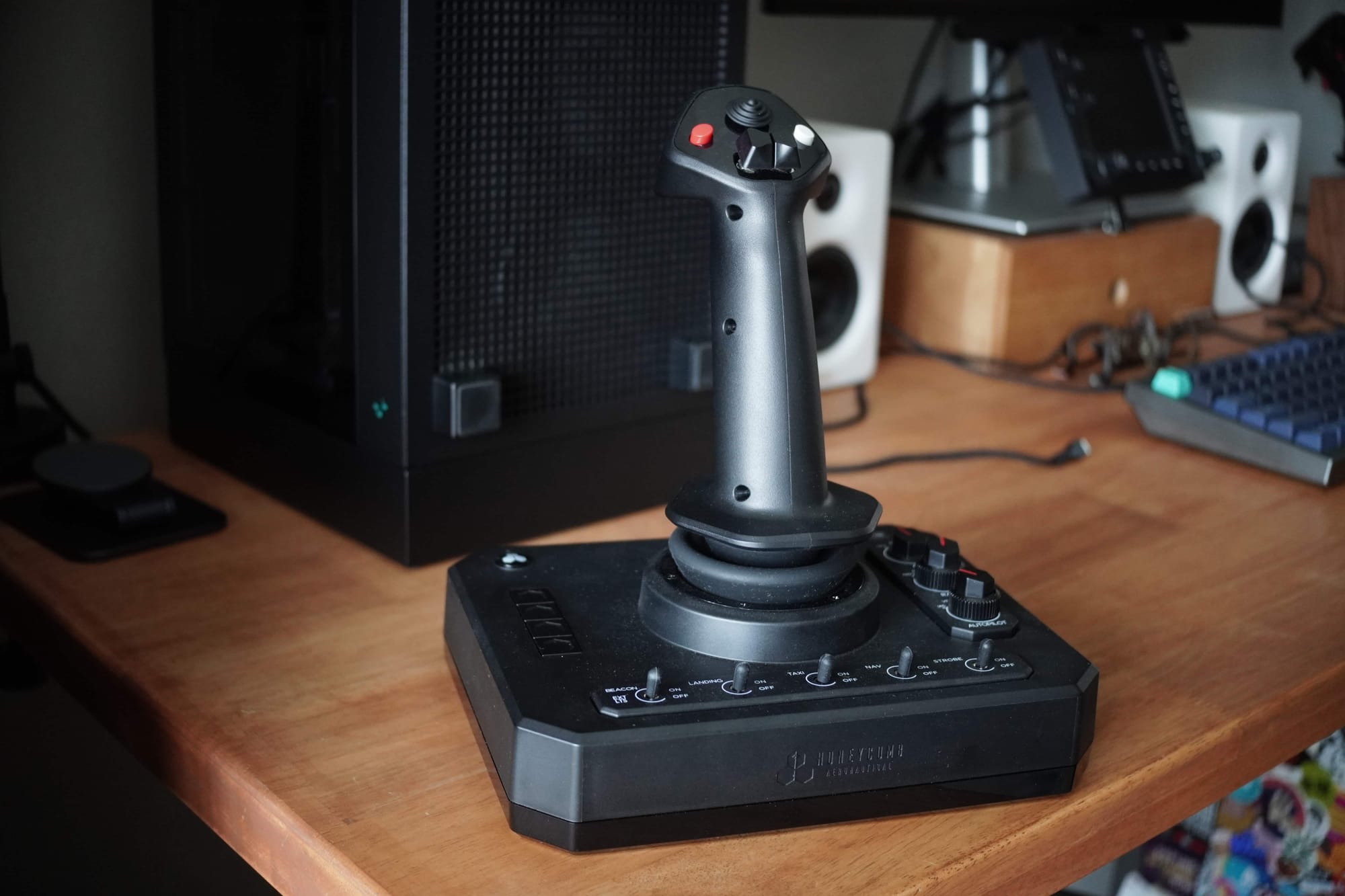
The Honeycomb Foxtrot Aviation Stick is a gimbal-based flight stick with an integrated base panel designed for GA and commercial sim flying. It connects via USB-C to USB-A and works with Microsoft Flight Simulator 2024 and 2020, X-Plane 11 and 12.
What makes it unusual is the base. Where most flight sticks give you a grip and a few buttons, the Foxtrot builds an entire switch panel around the stick:
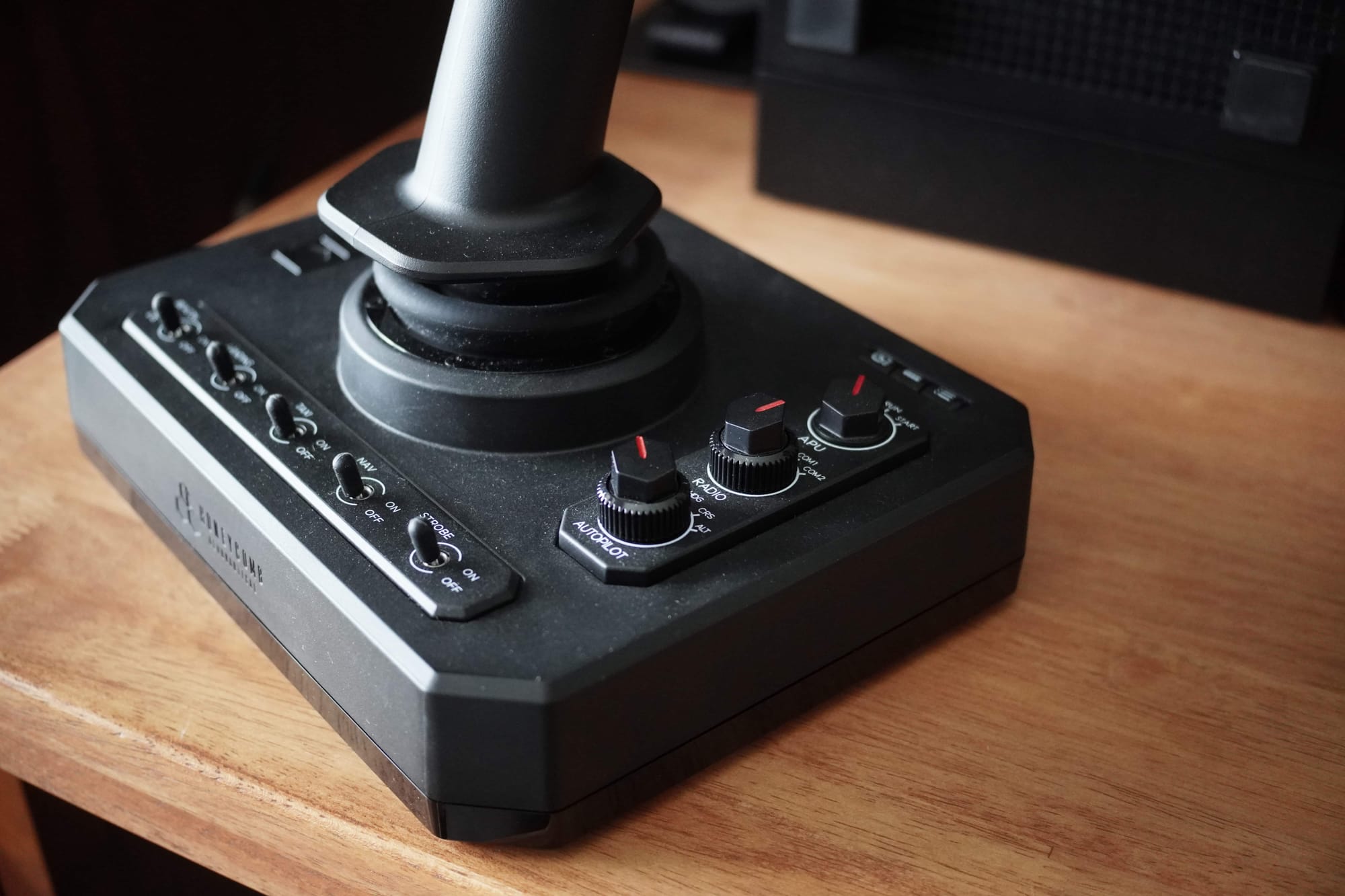
- 5 metal toggle switches for lights (beacon, landing, taxi, nav, strobe)
- Dual rotary encoders for radio and autopilot management
- A 3-position starter switch
- 4 programmable action buttons
- Trim switches and a POV hat on the grip
- Twist-axis rudder control
- A trigger and rocker switches on the grip
The stick uses 16-bit Hall Effect sensors on all axes with a linear resistance system — no center detent — and adjustable X/Y tension via hex key.
| Spec | Detail |
|---|---|
| Dimensions | 40 × 13 × 27 cm |
| Connectivity | USB-C to USB-A (cable included) |
| Sensors | 16-bit Hall Effect on all axes |
| Resistance | Linear, adjustable tension (hex key) |
| Design | Ambidextrous |
| Compatibility | PC, Mac — MSFS 2024/2020, X-Plane 11/12, Prepar3D |
| Warranty | 2 years |
| Price | US$149.99 |
The ambidextrous design is worth highlighting. The grip works in either hand, which makes the Foxtrot one of the few sticks that naturally supports left-hand operation — relevant if you are training for Diamond DA20, DA40, or similar aircraft with left-hand sticks.
This is what you should expect in practice:
- Plug-and-play recognition in MSFS 2024
- Downloadable MSFS profiles from Honeycomb's website
- A stable base that stays planted without mounting
- Significant center-return bounce that requires sensitivity curve adjustment
- This may be the narrowest, thinnest flight stick you can buy that mimics modern GA side-stick aircraft
Out of the box
The packaging is clean. The unit arrives well-protected, and first impressions are strong. The matte plastic finish is exquisite — a high-quality texture that satisfies the sense of ownership without the bulk. It does not feel like a toy, but it also does not look out of place on a standard desk. Honeycomb has completely rethought their material choice here. The hard matte surface is durable, less prone to scuffs over time, and less likely to get sticky and grimy in humid climates — a real consideration in Singapore and the rest of Southeast Asia.
In the box: the Foxtrot, a USB-C to USB-A cable, a quick start guide, and a 1.5mm hex wrench for tension adjustment. There is a storage slot for the wrench at the base of the controller — do not lose it.
One problem: my review unit arrived without the hex wrench. Honeycomb lists it as a box inclusion, so this appears to be a quality control miss. I contacted support to ask for the wrench dimensions so I could buy a replacement locally. The response: "Unfortunately, we don't have this information. We would need to check internally, but we can't say exactly when we might receive a response." Great.
That is a disappointing answer for a US$150 product. The wrench controls stick tension — it is not an accessory but a setup requirement. A manufacturer that cannot tell a customer the size of its own included tool is sending the wrong signal about post-sale support.
The build quality signals are otherwise strong. The metal toggle switches have a satisfying click. The rotary encoders feel precise. There's a "hub" USB-C port at the back, suggesting future expandability — perhaps for connecting a throttle unit — though Honeycomb has said nothing concrete about this.
Setup and first-use reality
Setup is straightforward:
- Plug in via USB-C — recognized immediately in MSFS 2024
- Download the General Controls and Airplane Controls profiles from Honeycomb's website
- In MSFS, go to the gear icon for General and Aircraft controls, create a new profile, and import both files
- Fly
Downloadable profiles from the manufacturer are a good touch — table stakes, even, but appreciated. Time from unboxing to first flight: under ten minutes.
One tip: reduce the sensitivity curve in MSFS 2024. The default response amplifies the stick's center-return bounce, making small corrections feel aggressive. Dialing back the curve tames the oscillation and brings inputs closer to what you actually intend.
Where training friction shows up (and why it matters)
A training device needs two things: reliable inputs and repeatability. The Foxtrot delivers on sensor precision but introduces friction in the stick behavior and panel usability.
Center-return bounce. This is the most significant issue. When you release the stick or reduce input, it does not settle smoothly at center — it bounces, probably compounded by the stiff dust boot (which strangely makes a popping sound as well). The oscillation is pronounced enough that it causes aggressive, unintended inputs on the aircraft. In real GA stick aircraft, you make small corrections and release smoothly. A stick that bounces at center forces you to consciously manage the return, which is the opposite of building clean motor habits. Reducing the sensitivity curve in MSFS 2024 helps, but this is a software workaround for a mechanical limitation.
No throttle axis. For a device designed to be a single-stick cockpit, the absence of a linear throttle is a strange omission. Power management is done through buttons on the base — not through the analog travel that builds throttle discipline. The VKB Gladiator NXT EVO at US$140 includes a throttle slider. The Foxtrot at US$150 gives you more panel switches but no throttle axis. For a student training circuit work, the throttle is the control you adjust most frequently after the stick itself.
No twist-axis lock. The twist rudder works fine as a Z-axis input. The problem is that there is no physical way to lock it if you use dedicated rudder pedals. Without a lock, you get accidental yaw inputs unless you disable the axis in your sim settings. The VKB Gladiator offers a physical twist lock for exactly this reason — a screw that stops any movement. For pilots who already own pedals — which includes most serious GA training setups — this omission means one more software workaround instead of a hardware solution.
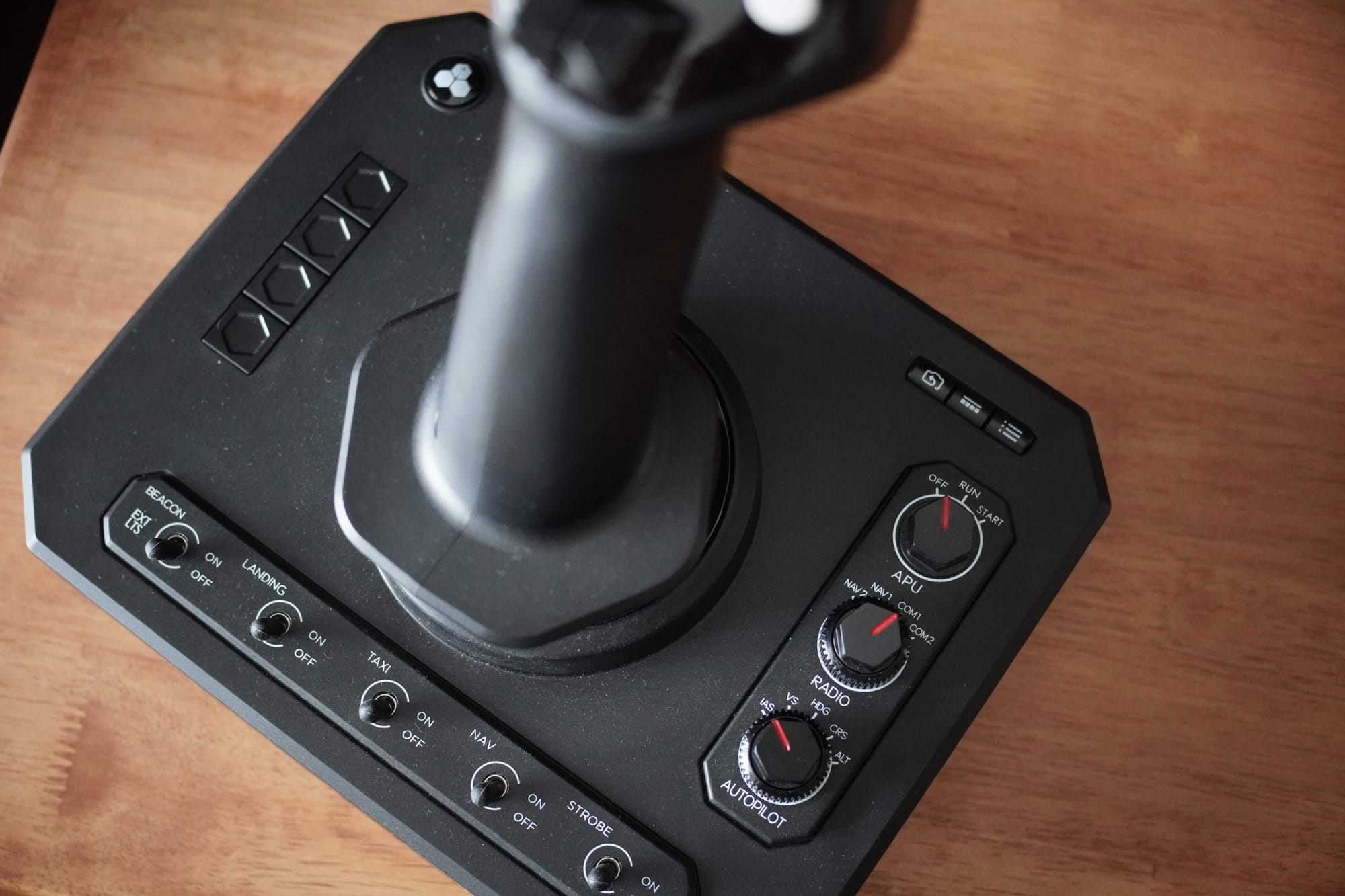
No backlight. The base panel has no illumination. In a darkened room — which is how many simmers fly evening sessions — the knob markings become difficult to read. Worse, depending on stick placement, the stick itself can block the markings on the base knobs, making them hard to set accurately even in daylight.
Rotary dial orientation. The radio dials place fractional values on the right and whole numbers on the left. That is the reverse of how radios work in real aircraft. A small thing, but for a product positioned around aviation training, it trains the wrong visual expectation. This can be fixed in settings, but can take some time.
Autopilot workflow does not reflect real procedures. The base rotary encoders for autopilot require you to select the mode in-sim first, then use the top knob to choose the variable and the bottom knob to adjust it. This sequence does not map to how autopilot management works in real GA cockpits. It is convenient as a sim shortcut, but it does not build transferable procedural habits.
Missing hex key and poor support response. The tension adjustment wrench was absent from my unit, and Honeycomb support could not provide the wrench dimensions. For a setup-critical tool, this is a post-sale failure that undermines confidence in the product.
PTT trigger. The push-to-talk trigger feels noticeably lighter and more plasticky than the rest of the unit. It feels like it could break with regular use — a concern for a control you reach for frequently during circuit work.
The Magenta Standard evaluation
Every piece of hardware reviewed by Magenta is audited against five pillars to ensure it functions as a procedural training device, not desk decoration. The point is not immersion. We are looking for procedural skills transfer.
| Criteria | Evaluation logic |
|---|---|
| 01 Mechanics | Does the hardware mimic the physical forces and control travel found in real General Aviation aircraft? |
| 02 Tactility | Does it support eyes-outside operation through distinct physical feedback and ergonomic positioning? |
| 03 Integration | How seamlessly does the device interface with Electronic Flight Bags (EFB) and professional training software? |
| 04 Procedural | Does the hardware support the muscle memory needed for actual syllabus requirements and cockpit checklists? |
| 05 ROI | Does the measurable gain in proficiency justify the hardware cost compared to wet-hire aircraft rental hours? |
1. Mechanics: does it mimic real aircraft control feel and response?
Verdict: Precise sensors, but the center-return bounce undermines stick discipline (2 out of 5)
The 16-bit Hall Effect sensors deliver excellent precision. At minimum deadzones in MSFS 2024, there was zero jitter and no unintended drift. The grip allows smooth, locked-on control during sustained inputs — pitch holds, coordinated turns, and crosswind corrections all feel clean.
The linear resistance system with no center detent is a deliberate design choice. There is no click at center. For some pilots this feels natural — closer to the progressive resistance of modern side-sticks. The adjustable tension via hex key lets you tune X and Y axis resistance to preference, which is a genuine advantage at this price point.
The problem is what happens when you release. The center-return action produces significant bounce and oscillation. In real stick aircraft, you develop the habit of smooth, deliberate returns. The Foxtrot's bounce trains the opposite — you either fight the oscillation or learn to over-manage the return. Neither habit transfers well.
The stick is light by default, which actually makes it feel more usable for extended sessions. The base stays planted under normal use — no sliding, no tipping, no mounting friction. That is a genuine strength, especially compared to heavier unsecured sticks like the VKB Gladiator.
2. Tactility: can you operate it eyes-outside?
Verdict: The stick yes, the base panel no — especially in low light (3 out of 5)
The stick grip itself is effective for eyes-outside operation. After a few sessions, the trigger, trim switches, POV hat, and rocker switches become second nature. The metal toggle switches on the base have distinct enough throw to operate by feel.
The rotary encoders are where tactility breaks down. The knob markings are small and often blocked by the stick itself, depending on placement. No backlighting means evening sessions require squinting or a desk lamp — exactly the opposite of eyes-outside training. The reversed radio dial orientation (fractionals right, whole numbers left) adds visual confusion even when you can see the labels.
For a device with this many base controls, the lack of any illumination is a meaningful gap.
3. Integration: does it fit real pilot workflows and real desks?
Verdict: Excellent desk integration, but the missing throttle axis limits training workflow completeness (3.5 out of 5)
The Foxtrot's greatest physical virtue is stability. The base stays planted on a desk without clamps, adhesive, or DIY mounting solutions. You can set it up and take it down between sessions without fuss — ideal for pilots who share desk space with other devices or non-sim work. Compare this to the Desktop Pilot TPM, where mounting friction was the central training failure. The Foxtrot has no equivalent problem.
The USB-C connection is clean and modern. The ambidextrous design means you can place it on either side of your desk — left-hand stick for Diamond DA20/DA40 training, right-hand for conventional setups.
The workflow gap is the missing throttle axis. A student pilot's training loop — downwind power reduction, base-to-final adjustment, go-around full power — requires a linear throttle. The Foxtrot assumes you will pair it with a separate throttle unit (such as the Honeycomb Bravo or Sierra TPM).
The twist rudder works as expected but cannot be physically locked. Pilots using dedicated pedals must disable the twist axis in software to prevent accidental inputs.
4. Procedural value: does it make you better at flying?
Verdict: Unmatched breadth of procedures at this price, but depth is shallow on the controls that matter most (3 out of 5)
No other US$150 stick lets you practice this many procedures from a single device: light sequencing, radio frequency management, autopilot adjustments, and trim. The four programmable action buttons can be mapped to additional functions, but the dedicated, labeled controls are where the real procedural value lives. For a student pilot learning the flow of a cockpit — where things are, what gets touched when, and in what order — this panel density has real value.
The five light switches (beacon, landing, taxi, nav, strobe) build correct sequencing habits for engine start and taxi. Trim switches on the grip keep your hand where it belongs during circuit work. The 3-position APU starter switch is a rare and welcome addition at this price though not useful for GA.
The procedural limits are in the controls you use most frequently:
- Autopilot management through the rotary encoders does not reflect real cockpit procedures — it is a sim convenience, not a transferable skill
- Radio dial orientation is reversed from real aircraft, training the wrong muscle habit
The breadth-versus-depth trade-off is the core decision. The Foxtrot gives you more panel procedures per session than any other stick at this price. But the procedures it cannot train are the ones a student pilot needs to build first: throttle feel, clean stick returns, and coordinated rudder.
5. Price: is the ROI real?
Verdict: Extraordinary value density — if your training priorities match what it offers (5 out of 5)
At US$149.99, the Foxtrot's control density is unmatched. Nothing else at this price gives you a flight stick with integrated light switches, radio management, and autopilot control.
The direct comparison is the VKB Gladiator NXT EVO at US$140 excluding shipping. The Gladiator gives you a smoother center-return, a throttle slider, a physical twist lock, and a combat-proven gimbal. It does not give you any cockpit panel functions. These are two fundamentally different philosophies at nearly the same price:
- Foxtrot: Aviation-first panel density. More procedures per session, less stick refinement
- Gladiator NXT EVO: Flight-control-first. Better stick feel, throttle axis included, but you need separate hardware for everything else
For student pilots who already own a throttle quadrant and want to add stick control with cockpit panel functions, the Foxtrot is exceptional value. For students building a first training rig who need the core flight controls to be right before anything else, the Gladiator's stick quality and included throttle axis are harder to beat.
Verdict
The Honeycomb Foxtrot Aviation Stick has the right philosophy. At US$150, it compresses more cockpit functionality into a single stick than anything else on the market. The ambidextrous design, desk stability, and build quality all signal a company that understands what GA training setups need.
Two things are true at once:
- The panel control density is unmatched at this price — no other stick gives you this many procedures per session
- The stick behavior that matters most for training — smooth center returns, analog throttle, lockable twist — is where the Foxtrot falls short
Who should buy it
- Student pilots who already own a separate throttle and pedals and want a basic stick with integrated cockpit panel controls for checklist and procedure training
- Pilots training for left-hand stick aircraft (Diamond DA20/DA40, SportCruiser) who value the ambidextrous design
- Simmers who want a single device they can set up and tear down quickly without desk mounting
Who should skip it
- Students building their first training rig who need the core flight controls — stick feel, throttle axis, rudder — to be right before adding panel functions. The VKB Gladiator NXT EVO at US$140 is the better foundation
- Anyone who primarily flies in low-light conditions — the complete lack of backlighting makes the base panel difficult to use
- Pilots who use dedicated rudder pedals and want a physical twist lock rather than a software workaround
About this review
Honeycomb Aeronautical sent this unit for review with no financial arrangement. It will be kept for comparison with competing hardware and future software updates, if any. Honeycomb was not shown a draft before publication, and review angles were not discussed in advance.
Frequently asked questions
Does the Honeycomb Foxtrot have a throttle axis?
No. Power is managed through buttons on the base rather than an analogue lever, which is the omission that matters most for circuit work. The VKB Gladiator NXT EVO at US$140 includes a throttle slider.
Is the Honeycomb Foxtrot ambidextrous?
Yes. The grip works in either hand, which makes it one of the few sticks that suits left-hand-stick aircraft such as the Diamond DA40.
Does the Foxtrot work with MSFS 2024?
Yes. It is recognised immediately over USB-C, and Honeycomb publishes General and Airplane control profiles that you import through the simulator's control settings.
Why does the Foxtrot stick bounce at centre?
The gimbal overshoots slightly when you release it, compounded by a stiff dust boot. Dialling back the sensitivity curve in MSFS 2024 tames it, but that is a software workaround for a mechanical behaviour.
Is the base panel backlit?
No. The base panel has no backlighting, which sits alongside the centre-return bounce and the missing throttle axis as the three things holding the score down.