Honeycomb Sierra TPM long-term review: six months in at US$250
Honeycomb puts the whole GA engine panel in one US$250 unit, which suits a 172 student with the desk space for it but not a pilot moving into a light sport aircraft.
Sim to solo Flying for real as well? Compare training pathways →
Every engine control a piston pilot needs, on one cable, with solid metal vernier levers that feel right in the hand — held back by a trim wheel that will not let you set the sensitivity, and three levers set too close to grab cleanly.
| Mechanics | 3.5 / 5 |
| Tactility | 3.5 / 5 |
| Integration | 3.0 / 5 |
| Procedural | 4.0 / 5 |
| ROI | 4.5 / 5 |
The Sierra TPM Module carries the three levers that set engine power in a piston aircraft — throttle, propeller and mixture — and adds the flap lever, the landing gear lever, the trim wheel and the parking brake. Honeycomb sells the whole set as one module for US$250, on a single USB-C cable, in a single box — a rare setup, even in 2026. I have been flying behind this one for six months. That combination is why I called the Sierra the better buy when I reviewed Desktop Pilot's TPM box earlier this year.
Most of it holds up. The three metal levers are the best-engineered controls in the box. Moving the flaps, the gear and the parking brake to where your left hand already is does more for procedural training than any single axis can. Yet two things hold it back, and both sit under habits a student is trying to build: the trim wheel, and the gap between the three levers.
Two weeks flatters a trim wheel, but six months of trimming for real approaches does not.
About this review
Honeycomb sent this unit for review. It arrived in April 2026, and I have kept it so I can compare them against newer hardware as it arrives. The company suggested no angle for this piece, attached no conditions to it, and will read it for the first time when it publishes.
What this is
- GA engine control module: throttle, propeller and mixture verniers, plus flap lever, landing gear lever with LED indicators, trim wheel and parking brake
- Construction: metal vernier levers with color-coded handles; hard textured plastic case with no soft-touch coating (thank god!), and a glossy front panel
- Connectivity: USB-C to USB-A, cable in the box
- Compatibility: PC and Mac; Microsoft Flight Simulator 2020 and 2024, X-Plane 11 and 12, Prepar3D
- Dimensions: 298 × 303 × 123 mm
- Weight: 3.8 kg
- In the box: the module, USB-C cable, dual mounting solution, quick start guide
- Warranty: two years, limited
- Price: US$250
What you should expect in practice:
- A bulky unit that slides, so it has to be clamped down or mounted before you can fly it
- A desk-top clamp in the box, and no way to mount it underneath without buying or printing a bracket
- Landing gear LEDs that need Honeycomb's driver installed, and MSFS profiles that come from an unversioned private download
Setup and first-use reality
The packaging is the same standard Honeycomb has shipped for years, and the box is worth keeping for storage or resale. The module is heavy at 3.8 kg, but not enough to hold it: it slides, so it has to be fastened down before you can fly it. This is not a set-up-and-fly device the way a joystick is.
The shell is a deliberate change from Honeycomb's older cases. Everything except the front face is hard, textured plastic with no soft-touch coating, where the Alpha uses a silicone-treated finish that turns tacky in humid climates over a few years. That material picks up dust and wipes clean, which the Alpha's finish stops doing.
The front is the exception, and it is the one part of the exterior I would change. It is a shiny plastic that cheapens the look of the whole unit. Think piano black TV remote controls after your kids get their hands on it.
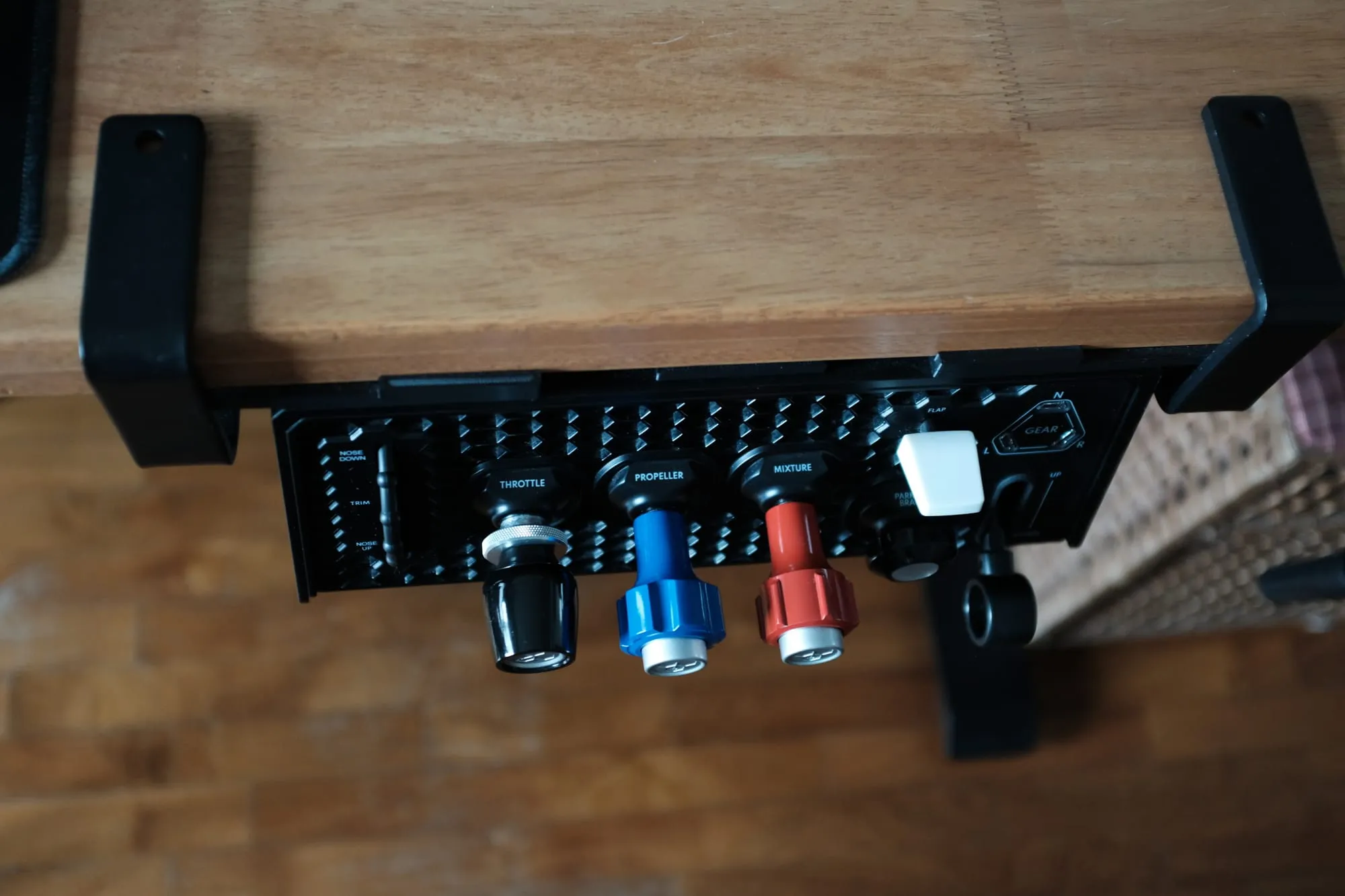
It is also a large thing to give desk space to. At 303 mm deep the case is close to an Alpha's depth, because three push-pull shafts need somewhere to travel. The footprint and the depth together need more desk than most sim gear does, and that is the strongest argument for mounting it underneath rather than on top.
The mounting is the real problem, and it is a Honeycomb pattern rather than a Sierra one. The box carries a desk-top solution: a base plate with suction pads and two tabletop clamps.
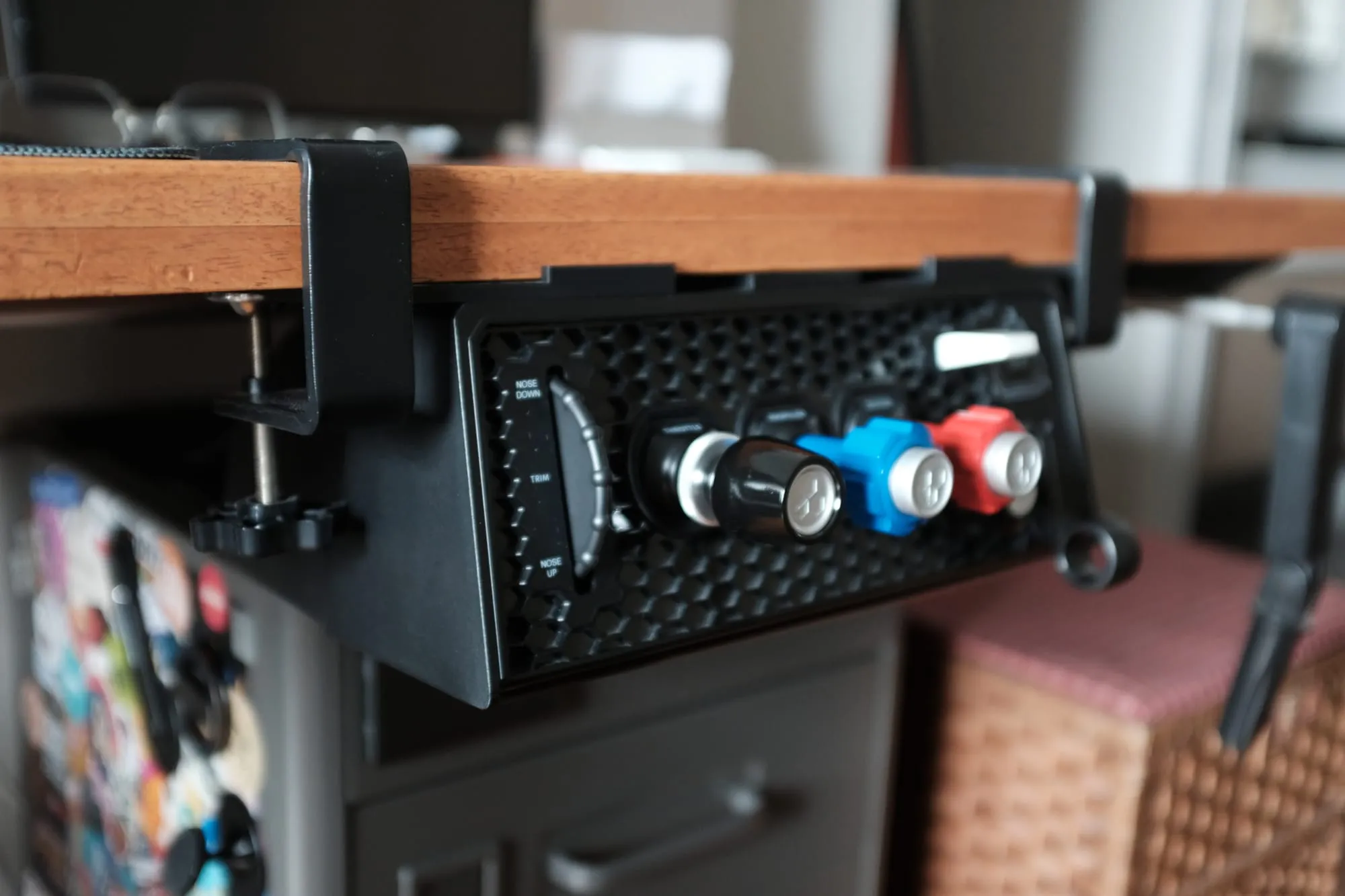
Despite demand for one, Honeycomb does not ship or sell an under-desk mount, which is where these controls live in a real aircraft. The licensed answer is a €60 CNC-machined aluminium bracket from CockpitCrafters, and there are free 3D-print designs that do the same job. I printed my own, which is what most owners end up doing, and the module has lived under the desk since.
A unit that has to come off the desk between sessions gets used less, and less use is less training.
The Magenta Standard evaluation
1. Mechanics — 3.5/5
The three verniers are the best part of this module. The throttle is a push-pull shaft with a friction screw, which is how a Cessna's throttle works. The prop and mixture add a vernier fine adjustment — press the button, move the shaft, then twist the knob to trim the last part of a setting. They are metal-bodied and color-coded, and they are heavy enough that the knobs are probably metal too. The twist on the prop and mixture changes the setting rather than the resistance. Only the throttle's screw adjusts friction.
Two things pull the score down. The parking brake is too stiff, and it has stayed that way across several months of use rather than loosening up. A control that a student would set once before taxi should not need a firm two-finger pull to move.
The friction parts have a reputation for going the other way too. Owners report the throttle's friction collar arriving too loose to hold the lever at all, and needing a replacement unit to fix it. In the unit I tested the throttle held, and the control that needed attention was the parking brake.
The trim wheel is the bigger issue, because it is an encoder rather than an axis: the module sends repeated trim-up and trim-down steps instead of a trim position. The wheel turns smoothly, and it does not have the synchronisation jump that the Turtle Beach VelocityOne Flight's analog trim axis is known for. It cannot change how much trim one turn produces. In Microsoft Flight Simulator 2024 the steps are small enough that trimming for an approach takes a lot of rolling for a small effect. SimTrim, FSUIPC7 or the AuthentiKit Tuning App with vJoy all override the step size and make the wheel usable. (I made my own free trim software that might be useful too — Trim Zero.)
Owners report the step count does not scale with how fast you turn the wheel, so rolling it quickly does not send proportionally more trim. That is the opposite of how a trim wheel behaves in your hand (and the same is reported for the Bravo).
A wheel built on an analog axis moves the trim proportionally instead of in steps, and the Meza trim wheel is still the one I reach for. I cannot set its sensitivity either, so the axis fixes the stepping without handing you a sensitivity dial. The module needs third-party software before a primary flight control behaves the way it should.
2. Tactility — 3.5/5
Any control you use in flight has to be findable without looking at it. The verniers pass on shape and color: the handles are distinctive enough that your hand knows which one it has. The flap lever and the gear lever are easy to find and easy to move, and I have never had to look down to select either of them.
The prop lever in the middle fails that test. The three verniers sit so close together that getting your fingers around the middle one means forcing them in between the other two. I have to look, and looking is the moment the layout stops teaching anything. Spacing them a little further apart would have fixed this, and the housing had room for it.
Nothing on the panel is backlit, which I prefer. The only lights are the three gear indicators, so in a dark room there is nothing to help you find a control, and by touch alone you are working from the vernier handles and the flap lever.
3. Integration — 3.0/5
On its own USB port the module enumerates as a single device, and one USB-C cable connects it. Past that, Honeycomb leaves the software work to you.
The landing gear LEDs need Honeycomb's driver installed, and when I first tried in April 2026 it would not install at all, because the driver only installs when Microsoft Flight Simulator's community folder sits in its default location. A later driver update from Honeycomb resolved the LED behavior itself and the lights now work.
The driver is the same application that runs the Bravo's gear lights, and it is named for the Bravo rather than the Sierra. Owners also report the indicators sitting green and never showing red in transit, which is the half of a gear indicator a pilot actually watches. I fly a C172 most of the time, so undercarriage isn't something I think too much about.
The profiles are the bigger gap. Honeycomb's MSFS 2024 download for the Sierra is a single file for the Cessna, and owners report that importing it into the sim's airplane controls returns a failed error. Oddly, there is no version number and no changelog anywhere on the download page, so nobody can tell whether the profiles have been touched since the module shipped. Honeycomb has announced no update. Honeycomb's own downloads page lists no airplane profiles for MSFS 2020 at all, only the LED driver.
The driver Honeycomb publishes covers MSFS only, so X-Plane and Prepar3D pilots get no LED indication.
4. Procedural — 4.0/5
This is the reason to buy the module. Throttle, propeller, mixture, flaps, gear, trim and the parking brake all sit in one place, the way they sit in a 172. A student can run engine start, the run-up, the before-takeoff checks, the gear and flap sequence on approach, and the shutdown flow without reaching for a keyboard. Every action stays in the order the circuit expects.
It is the clearest picture of a full flight I have had from one piece of hardware. The trim wheel is what costs it a perfect score. Letting go of a trimmed aircraft is a core skill, and a control that needs dozens of turns to produce a change teaches the wrong timing.
5. ROI — 4.5/5
At US$250 this is the cheapest way I know of to put a full GA engine panel on a desk. The nearest rival TPM box I have reviewed sells for US$340 and delivers less.
Buyers outside the US should budget for more than the sticker price. Add shipping from the United States, GST on arrival, and €60 if you want the licensed under-desk bracket rather than a print. A buyer who has to assemble and stow the rig every session should price the mount in.
Six months on
Nothing on this module has broken. The vernier levers feel as tight as they did on day one, the flap and gear levers still move cleanly, and the gear LEDs have stayed working since the driver caught up. What started stiff has stayed stiff, which reads as a wear pattern rather than a fault.
At least two owners on the MSFS forums have had to send a module back, one because the throttle arrived unrecognised and jammed, another because the trim wheel began squealing after about a month. The warranty runs two years, and Honeycomb's notoriously poor support page does not link to its own downloads page, so a buyer chasing a driver has to find it alone.
Which aircraft is this for?
The Sierra matches the engine controls of a Cessna 172, or any piston single laid out the same way. In a light sport aircraft most of it has nothing to do, which is worth figuring out before you buy one.
The three levers are the reason. Throttle, propeller and mixture is the engine-control layout of a traditional piston single, and the Sierra reproduces all three in metal. A Rotax-powered LSA obviously doesn't have that layout. On a Bristell, a SportCruiser, Sling 2, or the Tecnam, you would map one lever and leave two of them with nothing to do.
The product page lists the simulators the module works with, and PC and Mac, and names the Cessna 172 once as an example of the aircraft it suits. Neither the product page nor the downloads page carries a list of the aircraft it actually supports, and the one file that would show you, the profiles download, is a locked link. Matching the module to the aircraft you fly is extra homework for you.
There is a smaller version of the same problem inside the aircraft Honeycomb names. A Cessna 172 has fixed landing gear, so the gear lever and its three indicator lights have nothing to do on the aircraft the module is marketed around.
Who this is for
- A student pilot training in a Cessna 172 or another piston single with a manual mixture control and a propeller lever, who wants engine, flap, gear and trim controls in one purchase
- A sim pilot who wants the panel under the desk rather than on it, and is willing to print or buy a bracket
- Anyone building a 172-style home setup who has been binding flaps and gear to keyboard keys
- A simmer who wants to complete the look with their Honeycomb Alpha
Who should skip
- Anyone training in the light sport aircraft space, where a Rotax engine and a fixed-pitch propeller leave two of the three levers unused
- A pilot who wants an autopilot or a radio panel on the same unit, since this one carries engine controls and no avionics
- A pilot flying glass or multi-engine aircraft, where the GA vernier layout matches nothing in the aircraft
- Anyone who wants plug-in-and-fly trim: this needs SimTrim or an equivalent for MSFS 2024
- A desk with no room under it, or a shared desk where a permanently mounted unit is not an option
- X-Plane or Prepar3D pilots who want the gear LEDs working, since the driver covers MSFS only
What would change the verdict quickly
- Space the three verniers so the middle lever can be grabbed without looking
- Give the trim wheel a step-size or sensitivity setting in Honeycomb's own software, so MSFS 2024 pilots do not need a third-party tool
- Include the under-desk bracket in the box, or sell one on the storefront. The licensed design already exists
- Publish versioned profiles that cover more than one aircraft, import cleanly into MSFS 2024, and exist at all for MSFS 2020
- Relax the driver's dependency on MSFS's default community-folder location, and publish an X-Plane or Prepar3D LED driver
Frequently asked questions
Is the Honeycomb Sierra TPM worth it?
At US$250 it is the cheapest way I know of to put a full GA engine panel on a desk. It is worth it if you train in a Cessna 172 or another piston single with a manual mixture control and a propeller lever.
Does the Sierra TPM work with a light sport aircraft?
Most light sport aircraft have nothing for two of the three levers to do. A Rotax-powered LSA has no mixture lever, and many leave the factory with a fixed-pitch propeller, so you would map the throttle and leave the propeller and mixture levers idle.
Why does the trim wheel feel wrong in Microsoft Flight Simulator 2024?
The wheel is an encoder, so it sends repeated trim-up and trim-down steps instead of a trim position. MSFS 2024's steps are small, so trimming for an approach takes a lot of rolling for a small effect. SimTrim, FSUIPC7 or the AuthentiKit Tuning App with vJoy override the step size.
Can you mount the Sierra TPM under a desk?
Honeycomb ships a desk-top clamp and sells no under-desk mount. The licensed bracket is a €60 CNC-machined aluminium mount from CockpitCrafters, and free 3D-print designs do the same job.
Does the Sierra TPM need a driver?
Only the three landing gear LEDs do. Honeycomb's driver installs only when Microsoft Flight Simulator's community folder sits in its default location, and it covers MSFS only, so X-Plane and Prepar3D pilots get no LED indication.