
Trim Zero
Digital trim for an analogue wheel: zero the physical mark against the sim, calibrate the short arc, and see the drift before it bites.
Trim Zero
Make the TAKE OFF mark mean something.
Digital trim for an analogue wheel. Zero the physical mark against the sim, calibrate the short arc, and see the drift before it bites.
Free, v0.2.1. Windows 10/11. No telemetry, no updater.
The problem
An analogue trim wheel is an absolute axis. The sim's autopilot, a reload, or a lost control preset moves trim; the wheel does not. The next movement snaps the aircraft back to the wheel, and the TAKE OFF mark stops matching what the aircraft is doing.
What it does
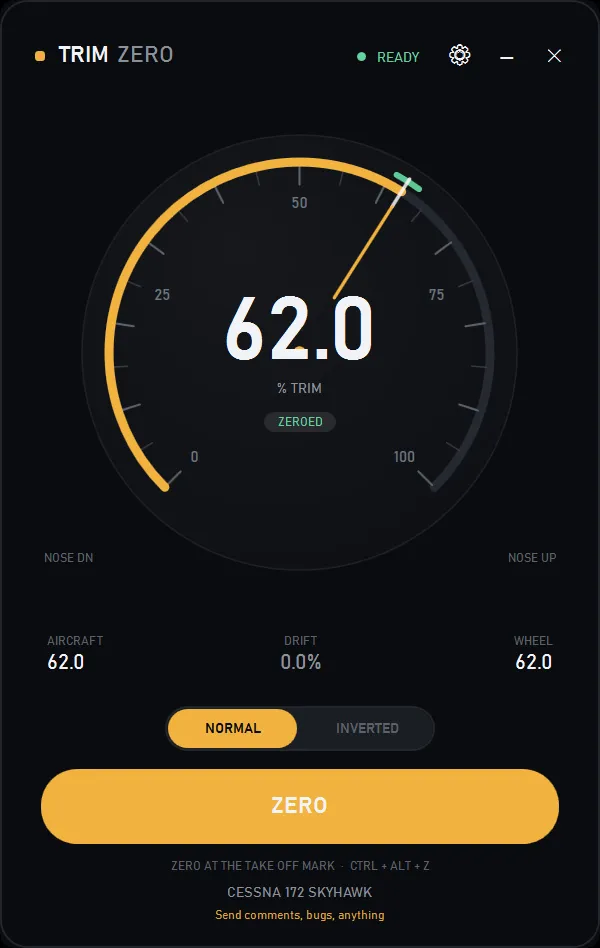
Trim Zero adds the datum the mark never had: a record of where the physical mark sits against the aircraft's trim, calibration of the wheel's short arc, and a visible drift when the two disagree.
- ZERO records the wheel count at the mark and the aircraft's trim. It writes no trim, so it cannot move the aircraft
- Two gains, one either side of the mark, expand the wheel's short travel to the aircraft's full range
- Drift is always shown, so you know when the autopilot has moved trim away from the box
- Direction is remembered per aircraft, because different aircraft trim in opposite directions
- The wheel goes inert while the autopilot is engaged, and re-seeds when you disconnect
- Start with Windows, minimized. It waits for MSFS before it appears: no service, no admin rights, no tray icon

Supported wheels
Analogue axes only. The Meza trim wheel, Saitek and Logitech wheels, the Desktop Pilot wheel, and any DIY axis that appears as a DirectInput axis. Not for encoder wheels such as the Honeycomb Bravo or Sierra, which send steps rather than a position.
Setup
- Clear the binding on your wheel's own Elevator Trim Axis action in MSFS Controls. If the sim still holds the axis, the sim and Trim Zero both write trim and fight each other
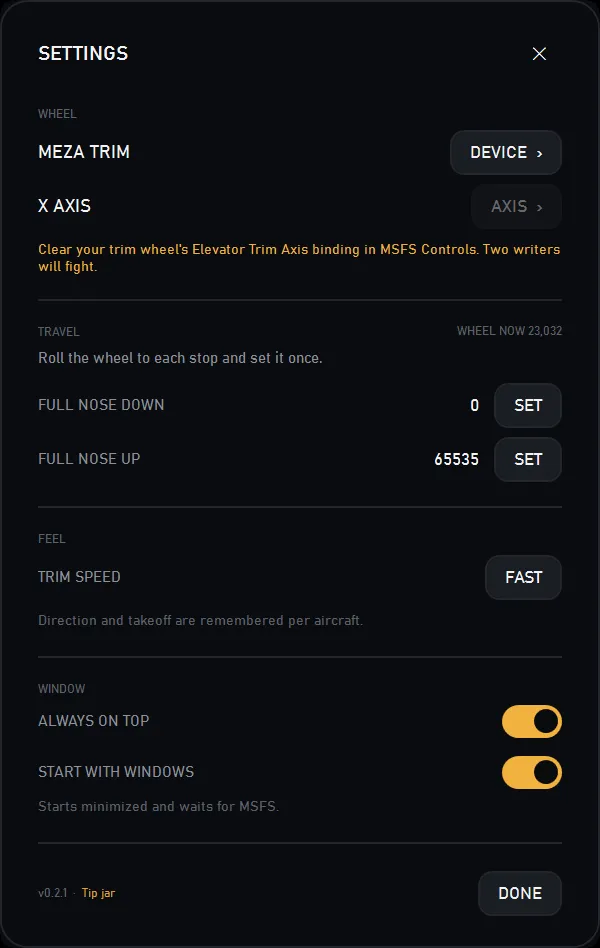
- In settings, choose your wheel under DEVICE, then the trim axis under AXIS. A device named Meza or Trim is picked up automatically; anything else is one click away
- Roll to each stop once and press SET, so the app learns the wheel's real travel
- Set the aircraft to takeoff trim, park the wheel on the TAKE OFF mark, then press ZERO
- Fly. ZERO re-datums at any time, and the drift tells you when to
What is verified
Tested against MSFS 2024 with the Meza on the desk. The trim write is proven: ELEVATOR TRIM POSITION moves the aircraft, while ELEVATOR TRIM PCT is readable and ignored. The hand-driven pass on the C172 now passes, and so does the autopilot clutch. The A32 passes too, including the switch back to the C172 with its datum intact. Start with Windows was tested minimized; a full logout and login has not been run. The device picker has only been tried with the Meza, so other analogue wheels should appear under DEVICE but are untested here.
Changelog
- Device auto-detect now only takes a device whose name contains Trim, and ignores devices with no axes, so a button panel cannot win the pick. Changing the device or the axis clears the saved takeoff datum
- A new aircraft no longer reads WHEEL OFF DATUM before the first ZERO. The drift, the wheel figure and the ghost tick stay hidden; the dial prompts PRESS ZERO AT THE MARK
- Start with Windows, minimized. It waits for MSFS; no service, no admin, no tray. A second launch brings the running window back
- Device picker for any DirectInput analogue wheel. A device named Meza or Trim is picked up automatically; anything else is chosen under DEVICE, then AXIS
- Direction and the takeoff datum are remembered per aircraft
- The tip jar moved into the settings footer
- The version now comes from the build
- First release. ZERO, two gains, drift, per-aircraft direction and the autopilot clutch
Trust
MIT licensed, source on GitHub. No network, no telemetry, no updater, no tray icon. Settings live in a per-user file. The only outbound action is the feedback link, which opens your mail client.
I built this for my own Meza, after reviewing the wheel. The review unit came from Meza; the app is free and has no affiliate link.
Trim Zero is free and stays free. If it saved you a bad flight, there is a tip jar.
