
Magenta Bridge for PU Air Radio
A free Windows client for the PU Radio panel in MSFS 2024: COM and NAV tuning on both rows, the four readouts driven from the live sim, and a guided panel test.
Magenta Bridge for PU Air Radio
A Windows client for the PU Radio panel in MSFS 2024. The panel's rings tune the aircraft's radios, its four readouts show what the sim actually has, and the window shows you whether the panel and the sim are connected.
Free, v0.1.0. Windows 10 and 11. Self-contained: no .NET runtime, no driver, no SimConnect redistributable.
Why this exists
PU CONNECT is PU Air Korea's own app, and it runs the radio. This one does the radio only, in a window of its own.
The panel's four digits show what the aircraft is tuned to, so you can read a frequency without looking up at the screen. When the sim is closed, the panel becomes a clock.
One thing is worth knowing. PU CONNECT keeps the display brightness as a setting, and if it ends up at zero the digits go invisible while the panel is still working. If your panel ever goes dark, check that setting before you take it apart.
What's different from PU CONNECT
| PU CONNECT's radio page | Magenta Bridge | |
|---|---|---|
| COM1, COM2, NAV1 and NAV2 tuning from the panel's rings | Yes | Yes |
| Active and standby transfer on the knob pushes | Yes | Yes |
| COM or NAV formatting follows the panel's own switches | Yes | Yes |
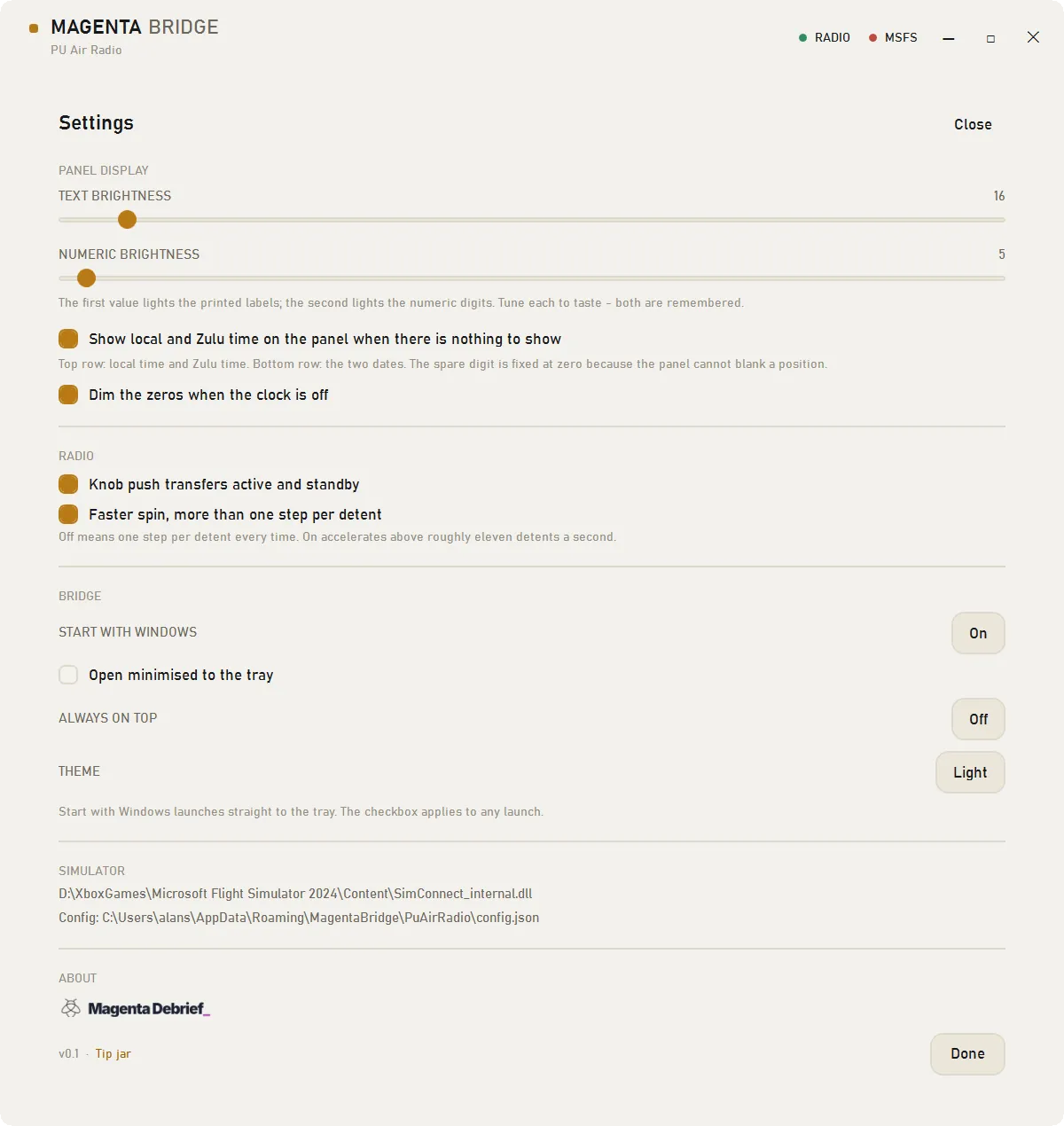
| Display brightness | Stored as a setting; at zero the digits become unreadable | Two fields, both remembered |
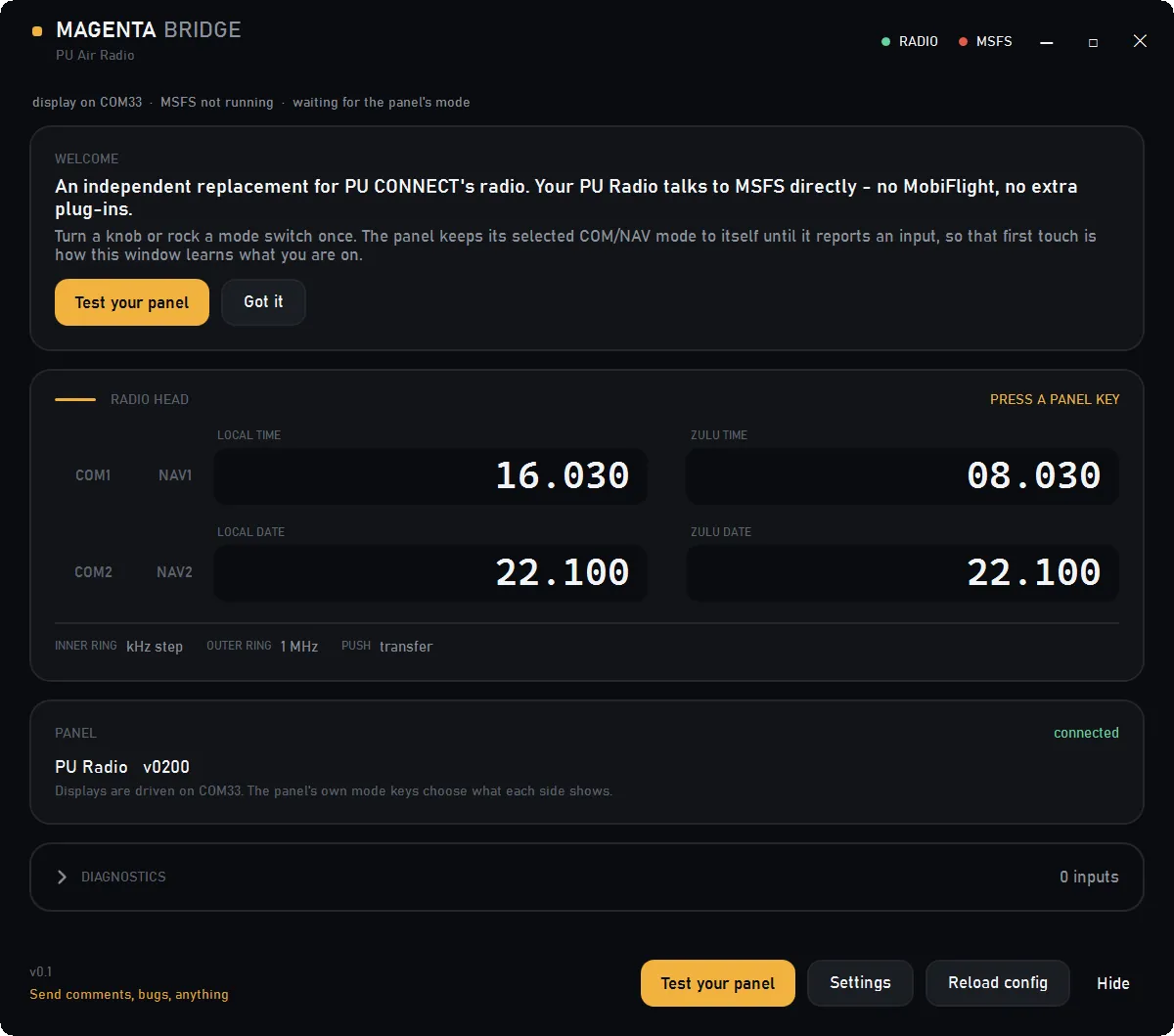
| What the window shows | A settings page | A radio head: both rows, active and standby, and the aircraft's name |
| Clock on the panel when the sim is not running | No | Local and Zulu time, and the two dates |
| Guided test of the panel's inputs | — | Lists all 14 as they arrive |
| Licence | Closed | MIT, source available |
Where an aircraft keeps its own radio management panel, neither client reaches it, because those aircraft ignore the standard SimConnect radio events.
What does not work, and why
- The panel drops encoder detents before they reach the PC — an independent capture, with no client running, counted about five reports from twelve deliberate clicks, and PU CONNECT loses the same ones, so turn deliberately and hold a knob push for about half a second
- Study-level airliners that run their own radio management panel ignore the standard events this sends, and reaching those needs a WASM module, which is out of scope for this release
- 8.33 kHz spacing depends on the aircraft, because the display handles three decimals but the tuning events belong to the sim
- One panel at a time — two PU Radios on one PC is not supported
- The clock cannot blank a digit, so its last position stays at zero: 11:10 reads as
11.100, and a date reads as22.10with the same trailing zero
Setup
- Close PU CONNECT if it is running. It holds the serial port, and the window names the program and offers a Close PU CONNECT button when the port is busy
- Start MSFS and load a flight
- Run
MagentaBridge-PuAirRadio.exe. There is nothing to install and no runtime to add - Turn a knob or rock a mode switch once, so the bridge learns which row is COM and which is NAV. Test your panel then shows every input as it arrives
If MSFS has bound the panel as a game controller, clear its assignments in Options > Controls or give it an empty profile. The bridge reads the raw HID reports, so the bindings make no difference to it, but a bound button would otherwise fire twice.
What is verified
Checked in MSFS 2024 with the C172SP: the readouts match the sim, COM1 transfers, NAV formatting follows the switches, all 14 controls appear in the self-test, and the window reports the case where PU CONNECT still holds the port. MSFS 2020 and Windows 10 have not been tried.
Questions
Does the PU Radio work in MSFS 2024 without PU CONNECT?
Yes. This client reads the panel's buttons over USB and writes its displays over the panel's own serial port, so PU CONNECT does not need to be running. The two cannot run at the same time, because the serial port takes one program.
Is Magenta Bridge free?
Yes. It is MIT licensed, the source is on GitHub, and there is no telemetry, no updater and nothing to buy. It is a Magenta Debrief tool, built at my own desk for the panel I fly with.
Why does the panel show a clock when it starts?
The panel keeps its selected COM/NAV mode in its own firmware and only reports it when a control changes. Until you touch something, nothing on the wire says which row is COM, and there are no frequencies to show, so the panel shows the clock: local and Zulu time on the top row, the two dates below. The window says PRESS A PANEL KEY. One turn or one switch is enough, and the clock comes back whenever the sim is not running.
Why do the frequencies look wrong on the panel?
The readouts are five digits, so the panel drops the leading 1 on a COM frequency: 121.075 appears as 21.075. The window always shows the whole frequency, so both agree.
Does it work with the PU Air GNS 530?
No. That panel has its own screen and its own app, and this build reads the radio panel's USB device only. The two are separate products.
Does it work in MSFS 2020?
It was written against MSFS 2024 and tested there. 2020 exposes the same radio events and should work, but nobody has confirmed it.
Changelog
- First release: COM and NAV tuning on both rows with transfer, the four readouts driven from the live sim, both brightness fields, a guided test of all 14 inputs, and the panel clock
Trust
MIT licensed, with the source and the issue tracker on GitHub. No telemetry, no updater, no network calls. Settings live in a per-device folder, and this build writes to %APPDATA%\\MagentaBridge\\PuAirRadio\\.
Written independently, with no affiliation to PU Air Korea and no endorsement. PU CONNECT remains the vendor's supported client, and this is a free alternative, built at my own desk for my own flying, after reviewing the radio panel.
