
Tobii Eye Tracker 5 review: Expensive but worth it for flight sim training.
Head and eye tracking that reinforces the most critical habit in aviation — keeping your eyes outside the cockpit.
The moment you stop hunting for switches with a mouse and start scanning the horizon with your eyes, flight simulation transforms from a game into a training device. The Tobii Eye Tracker 5 delivers that transformation — and does it so seamlessly that within minutes, you forget it's there.
At US$339 (€280 at current conversion rates — I paid €223 on a Christmas sale, not sponsored), it's the most expensive head tracking option on the market. Pricing varies by region. But for pilots building toward their first solo or maintaining currency between flights, it's the only system that reinforces authentic cockpit discipline: eyes outside, hands on controls.
What it is
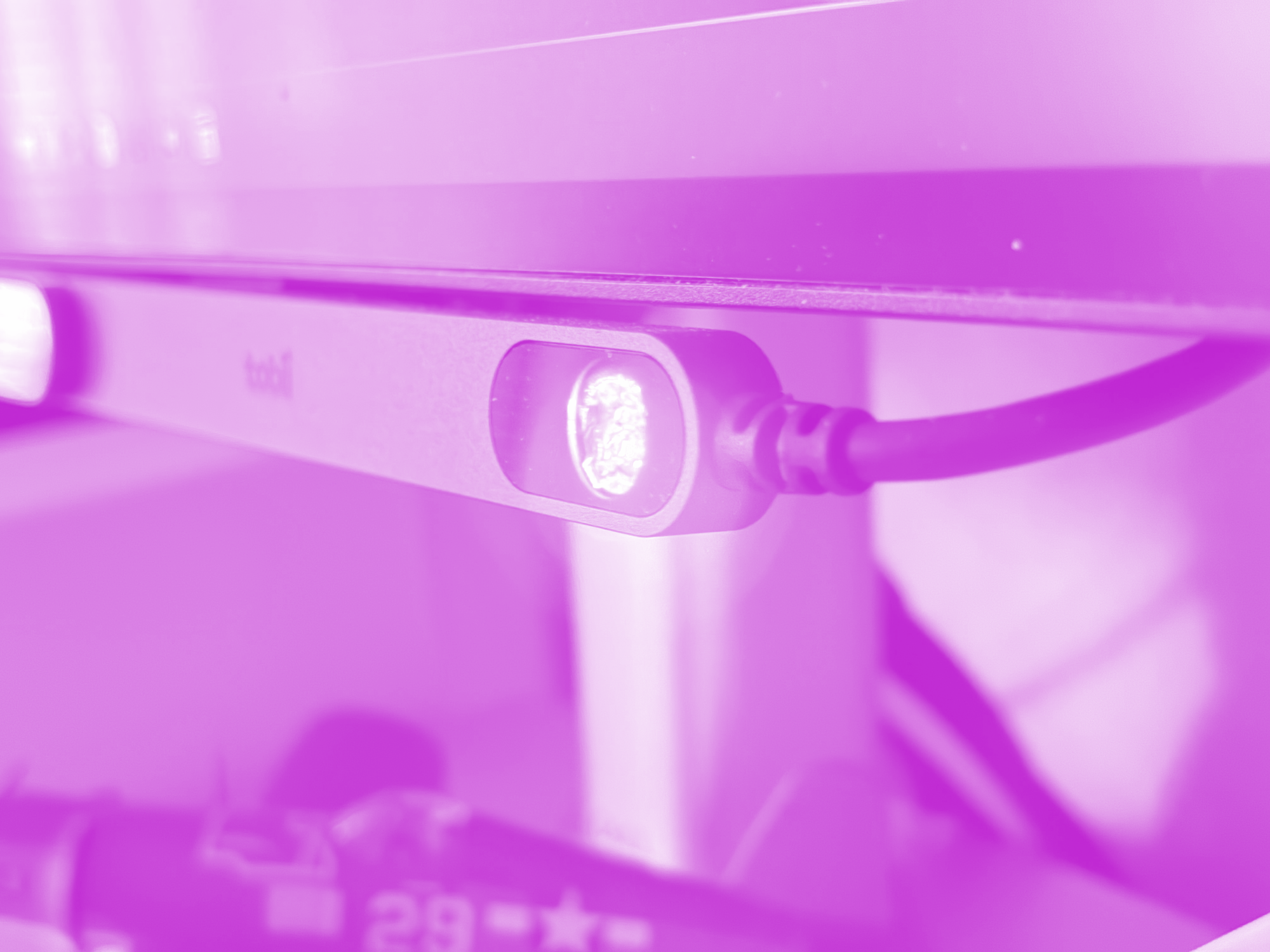
The Tobii Eye Tracker 5 is a 28.5cm bar that clips to the bottom of your monitor. Inside are infrared sensors that track both your head position and eye movement. Move your head slightly right, and the sim camera pans to show your wing. Glance at the instruments, then look back up, and the view follows naturally - exactly as it does in a real aircraft.
Unlike TrackIR or OpenTrack solutions that require you to wear a hat clip or reflector, the Tobii is completely passive. No accessories. No setup ritual before each session. Plug it in once, calibrate for two minutes, and it works every time you sit down — including with glasses.
The hardware itself feels almost overbuilt. The bar has a machined aluminum finish and carries surprising heft for a device that never moves. The magnetic monitor mount is secure without leaving marks, and the included USB extension cable is long enough to reach most PC setups.
One design limitation: The USB cable is permanently attached to the right side of the bar. You can't remove it, replace it, or flip the bar around to route the cable from the left. Depending on your desk layout and where your PC sits, this can create awkward cable routing. It's a minor thing, but worth considering if your setup demands clean cable management.
Setup: genuinely plug and play
This is where Tobii separates itself from every other tracking solution. Download the Tobii Game Hub software, plug in the bar, and run through a 90-second calibration where you follow a dot around your screen. That's it.
The system immediately works in Microsoft Flight Simulator 2020/2024, X-Plane 12, and DCS World with native integration. For other sims, OpenTrack support extends compatibility to another 150+ titles.
One critical caveat for MSFS 2024 users: If you've previously used OpenTrack or any head tracking software, you may encounter conflicts that prevent Tobii from working correctly. The fix requires editing the Windows Registry to remove old OpenTrack entries. It's a 5-minute fix, but took me an hour to troubleshoot — and it's the only significant setup friction I encountered.
Magenta Debrief Flight Sim Reviews
Get the latest hardware and software reviews delivered to your inbox.
The alternatives
Before investing in the Tobii, I tested two other head tracking solutions.
Beam Eye Tracker (US$25) is a software-only solution that uses your webcam. It's an excellent way to try head tracking without spending serious money. But it struggles in dim lighting and requires a high-quality webcam to deliver smooth tracking. I also found the always-on webcam a bit unnerving — a small thing, but enough to break immersion.
TrackIR 5 (US$170) is the long-standing standard. It works well and costs half what the Tobii does. But you need to clip a reflector to a hat every time you fly. That's fine for dedicated sim sessions, but it adds friction. The Tobii's passive operation means you can sit down for a quick pattern practice without any prep.
VR headsets offer complete immersion, but they come with significant tradeoffs for training use. Even mid-range headsets require careful setup, and most affordable options lack the resolution to read instruments, EFB displays, or checklist text clearly. That's a problem when you're trying to build procedures that transfer to real aircraft. The Tobii gives you natural head tracking while preserving full monitor clarity — you can read every dial, every frequency, every line of your approach plate.
The Magenta Standard Evaluation
Every piece of hardware reviewed is evaluated against five professional criteria to ensure it serves as a true procedural training device.
| Criteria | Evaluation Logic |
|---|---|
| 01 Mechanics | Does the hardware mimic the physical forces and control travel found in real General Aviation aircraft? |
| 02 Tactility | Does it support eyes-outside operation through distinct physical feedback and ergonomic positioning? |
| 03 Integration | How seamlessly does the device interface with Electronic Flight Bags (EFB) and professional training software? |
| 04 Procedural | Does the hardware support the muscle memory needed for actual syllabus requirements and cockpit checklists? |
| 05 ROI | Does the measurable gain in proficiency justify the hardware cost compared to wet-hire aircraft rental hours? |
WANT TO DIVE DEEPER? VIEW THE MAGENTA STANDARD →
1. Mechanics: Does it mimic real aircraft controls?
Not applicable. The Tobii doesn't replicate physical controls — it replicates pilot behavior. And in that context, it's flawless. Once you get the configuration right (sensitivity settings, and turning off the distracting eye tracking vs head tracking), the tracking latency is imperceptible, and head movements translate to camera movement with the same natural feel as turning your head in a real cockpit.
2. Tactility: Can you operate it eyes-outside?
Exceptional. This is the Tobii's core value proposition. In real aircraft, you develop muscle memory for every switch and knob position so you can keep your eyes on the horizon during critical phases of flight — takeoff, landing, traffic pattern work.
Mouse-based camera control forces the opposite habit: you look at the screen, move the mouse, click to change view, then try to reorient. It's the wrong training. The Tobii lets you practice the right behavior: scan for traffic, quick glance at airspeed, eyes back outside.
During pattern work, this distinction matters. You're checking downwind spacing, watching your turn to base, monitoring the approach path — all while occasionally referencing instruments. The Tobii makes that scanning pattern instinctive in the sim, which directly transfers to the aircraft.
3. Operational integration: Does it work with your other tools?
Strong. Native integration with the major sims (MSFS, X-Plane 12, DCS) means no middleware conflicts. The Tobii Game Hub software runs silently in the background and never interferes with EFB apps, VR headsets (if you swap between monitor and VR setups), or other peripherals.
The only friction point: If you run multiple monitors, the Tobii works best on your primary display. Side monitors can confuse the tracking if you glance at reference materials or charts. This isn't a dealbreaker — most pilots keep EFB apps on tablets or phone mounts anyway. And besides, most flight simmers will assign a keyboard or button toggle to quickly turn off the tracker.
Physically, the bar mounts low on the monitor and doesn't interfere with iPad mounts, kneeboards, or printed checklists. The cable routes easily and doesn't add clutter.
4. Procedural value: Does this help you pass a checkride?
High. The Tobii teaches the single most important habit in visual flight: keeping your eyes outside.
Flight instructors drill this constantly. During circuits, you should spend 90% of your time looking outside — at traffic, at the runway, at your turn points. The remaining 10% is quick instrument scans. Sim pilots using mouse camera control invert that ratio, spending most of their time looking at the cockpit or fighting with the camera.
Does it reduce flight hours to solo? Indirectly. If you're using the sim to build visual circuit awareness and develop a proper scan pattern, the Tobii ensures you're practicing the right techniques. That reduces the remedial work your instructor needs to do when you bring bad habits to the aircraft. For more on what sim training can and can't replace, see Why home flight sims help — and where they absolutely don't.
For more hardware reviews using the Magenta Standard framework, see our Octavi IFR-1 review.
5. Price: Does the cost justify the training value?
Borderline, but yes. At US$339 (€280), the Tobii costs as much as one flight hour in a typical training aircraft. The calculation is straightforward: if this prevents even two hours of remedial training on visual scanning and situational awareness - at US$400-US$500 per hour - it's paid for itself.
The counterargument is that TrackIR 5 costs around €140 and delivers 80% of the same value. That's fair. The Tobii's premium is entirely in convenience - no hat clip, no setup friction, more refined tracking. If you're price-sensitive, TrackIR is the smarter buy.
But if you want zero friction between "I have 30 minutes" and "I'm flying productive patterns," the Tobii is worth the premium. And unlike hardware that wears out (throttles, switches), this is effectively a one-time purchase. The Eye Tracker 5 has been shipping since 2020, and long-term users report no degradation in tracking performance after years of use.
Who needs this
If you're using MSFS or X-Plane to build toward your pilot's license, and you're serious about making sim time transfer to the aircraft, the Tobii should be on your desk before you buy a throttle quadrant.
It's the only piece of hardware that teaches correct behavior rather than just providing tactile feedback. And in recreational aviation training, where proper visual scanning prevents incidents, that behavior is more valuable than any switch or lever.
For a complete breakdown of training-focused hardware recommendations, see The Magenta Standard: Hardware for the Sim-to-Solo Path.
| Solution | Price | Wearables | Dark room performance | Re-centering | Native integration |
|---|---|---|---|---|---|
| Tobii Eye Tracker 5 | US$339 | None | Excellent (IR sensors) | Rare | MSFS, X-Plane 12, DCS |
| TrackIR 5 | US$170 | Hat clip required | Excellent (IR reflector) | Every 30-60 seconds | Most major sims |
| Beam Eye Tracker | US$25 + webcam | None | Poor (webcam dependent) | Frequent | Via OpenTrack |
| OpenTrack (free) | Free + webcam | None | Poor to fair | Frequent | 150+ titles |
The details
Price: US$339 (regular) / US$289 (refurbished) / watch for seasonal sales (I paid €223 at Christmas) Compatibility: MSFS 2020/2024, X-Plane 12, DCS World (native); 170+ other games via native integration or OpenTrack Mount: Magnetic flat mounts and flex mount included (works with flat and curved screens) Cable: 0.8m integrated USB cable plus 1m extension cable Operating distance: 45-95cm
Where to buy: Official Tobii store